For many seniors, the home is a place of comfort, memories, and hard-earned independence. Whether you have lived in the same neighborhood for decades or have recently moved closer to family, maintaining a sense of security is a top priority. However, as we age, some everyday tasks like rushing to the front door to see who is knocking can become a bit more challenging or even a safety risk.
This is where modern technology, specifically the video doorbell for seniors, steps in to bridge the gap.
In the past, “smart home” gadgets felt like they were only for the tech-savvy younger generation. Today, that has changed. A senior-friendly video doorbell is designed to be a practical tool that provides safety, convenience, and a massive boost in confidence for those aging in place. In this guide, we will explore everything you need to know about choosing, installing, and using a doorbell camera to make your home a safer, more comfortable place. Lets deep dive into “Best Video Doorbell for Seniors: Wireless, Without Subscription, Easy & Safe”
READ MORE: Best Smart TV for Seniors in 2026: Easy to Use & Large Screen Picks
What Seniors Should Look for in a Video Doorbell
When shopping for the best video doorbell for seniors, the “fanciest” model isn’t always the best. What matters most are features that cater to ease of use, clear visibility, and reliable performance.
Here are the key features to prioritize:
- Large and Clear Video Quality: Look for at least 1080p resolution. High-definition (HD) video ensures that faces are recognizable, even if the person isn’t standing directly in front of the lens.
- Simple Mobile App: The app is the heart of the experience. It should have large buttons, clear text, and an intuitive layout. If it takes ten clicks just to see the front porch, it’s too complicated.
- Loud and Adjustable Chime: Many seniors have some degree of hearing loss. A senior-friendly video doorbell should come with a “chime” (the part that plugs into a wall outlet inside) that can be turned up loud enough to hear from the back of the house.
- Two-Way Talk: This allows for clear, lag-free communication. It should work like an intercom, press a button to talk, release to listen.
- Motion Alerts: The doorbell should notify you when someone is on the porch, even if they don’t ring the bell. This is vital for spotting “porch pirates” or unexpected visitors.
- Night Vision: Most visits happen during the day, but security is most important at night. Look for “infrared night vision” or “color night vision” so you can see clearly in total darkness.
- Battery-Powered vs. Wired: * Wireless doorbell cameras for seniors are easier to install because they don’t require messing with electrical wires. However, the battery will need to be charged every few months.
- Wired options never need charging but usually require professional installation or help from a handy family member.
- Wide Viewing Angle: A “head-to-toe” view is best. This allows you to see both the person’s face and any packages left on the ground.
- Smart Display Compatibility: If you have an Amazon Alexa or Google Home screen, you can set it up so that the video automatically pops up on the big screen when someone rings the bell. This is much easier than fumbling for a smartphone.
READ MORE: Best Wireless TV Headphones for Seniors (2026) – Clear Sound & Easy Setup
Best Uses for Seniors and Caregivers
How does this technology actually look in daily life? Let’s look at a few real-world examples of how home safety for seniors is improved by these devices.
The “Stay Put” Strategy
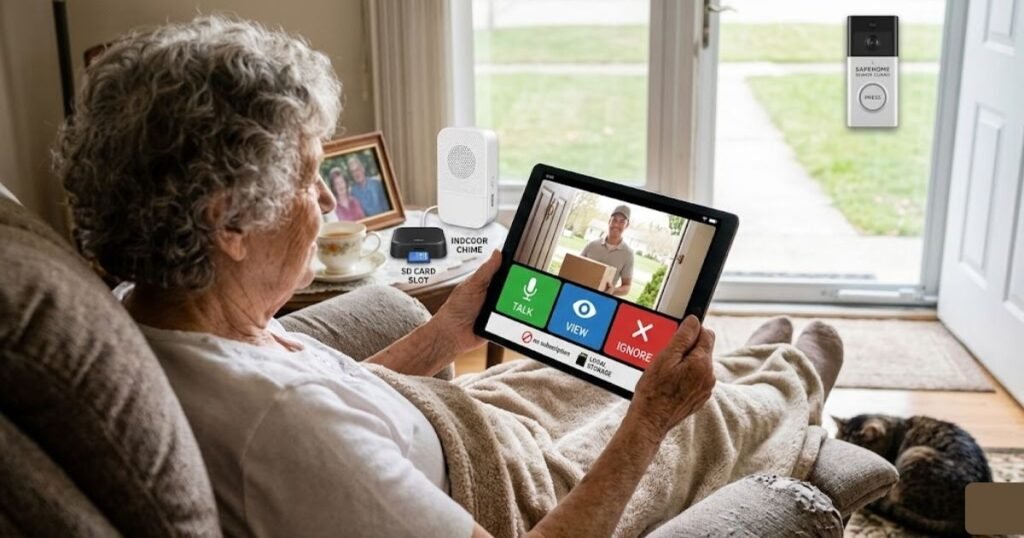
Imagine you are recovering from a knee replacement. The doorbell rings. Instead of grabbing your walker and struggling to the door, you simply pick up your tablet. You see it’s your grandson bringing over groceries. You can tap the “talk” button, say “The door is unlocked, come on in!”, and stay comfortably in your chair.
Monitoring Package Deliveries
With the rise of online shopping, packages are frequently left on doorsteps. A video doorbell lets you know exactly when a delivery arrives. You can even ask the driver to put the box behind a pillar or in a specific spot so it’s hidden from the street.
Caregiver Coordination
If a senior has a home health aide or a cleaning service, the video doorbell acts as a digital logbook. Family members can see exactly when the aide arrives and when they leave, ensuring that the senior is getting the care and time they were promised.
Deterring “Porch Pirates”
The mere presence of a visible camera is often enough to make a thief think twice. For seniors who may be seen as easier targets, this visible deterrent provides a significant layer of home safety for seniors.
READ MORE: Best Voice Assistant for Seniors 2026 — Safe, Simple & Senior-Friendly Picks
Top 6 Best Video Doorbells for Seniors
To help you narrow down the many options on the market, we have selected six of the most reliable and easy to use doorbell cameras currently available.
1. Ring Battery Doorbell
Ring’s Battery Doorbell (2nd Gen) is a strong all-around pick for families who want a familiar app and easy DIY installation. It offers Retinal 2K video, head-to-toe coverage, live view, two-way talk, motion detection, and a built-in rechargeable battery.
- Who it’s best for: Seniors who want a “standard” experience with plenty of customer support and easy setup.
- Main Strengths: Very easy to install; works perfectly with Amazon Alexa devices; the app is very reliable.
- Possible Limitations: Requires a monthly subscription to save and view past videos.
- Recommendation: A great choice for those who want a “set it and forget it” device that family members can also easily access.
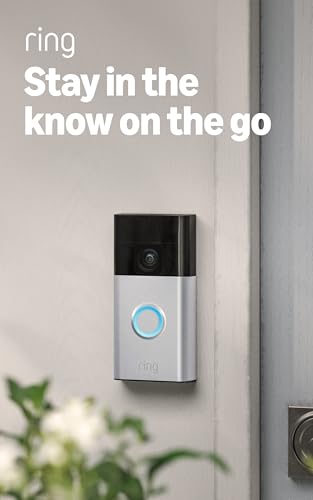
- See more at your home or business — Get 66% more vertical coverage with the latest version of Ring’s best-selling Video …
- Built-In Battery — Battery Doorbell includes a built-in battery, which charges with a convenient USB-C charging port. To…
- Install in a snap — Charge it up, click into place, and stay connected right from your phone.
2. REOLINK Video Doorbell WiFi Camera
Reolink’s Video Doorbell WiFi is built around 2K+ 5MP video, night vision, two-way audio, and smart person and package detection. The official product page also highlights stable Wi-Fi support and flexible chime options with compatible smart displays and voice platforms.
- Who it’s best for: Seniors who do not want to pay a monthly subscription fee.
- Main Strengths: You can save videos locally to a micro-SD card; very high-quality 2K video; includes a chime for inside the house.
- Possible Limitations: The app interface is a bit more “technical” than Ring or Nest.
- Recommendation: Best for the independent senior who is a little bit more tech-savvy and wants to avoid ongoing costs.

- 2K Super HD Day & Night! Incredible 2K HD, with advanced HDR/3D DNR and distortion correction technologies, brings you s…
- 2.4/5GHz WiFi & Waterproof! No worry about network disconnection; its 5GHz WiFi ensures a stable and fluent network expe…
- 4:3 &180° Wide Viewing Angle! Find the right position for your doorbell with its 15° wedge kit and enjoy the super wide …
READ MORE: Best Wireless Earbuds for Senior Runners: 2026 Top Picks
3. Blink Video Doorbell (Latest Model)
Blink’s current Video Doorbell uses two AA lithium batteries, and Blink says batteries are always required. The official specs list 1080p HD color video, 135° horizontal view, 80° vertical view, and up to two years of battery life under default settings.
- Who it’s best for: Seniors on a fixed budget or those who live in apartments.
- Main Strengths: Very inexpensive; can run for up to two years on two AA lithium batteries; very small and unobtrusive.
- Possible Limitations: The video quality isn’t quite as sharp as more expensive models; requires a “Sync Module” for the best experience.
- Recommendation: Perfect for a simple, low-cost solution that provides basic security without a lot of bells and whistles.

- Video Doorbell is our second-generation smart security doorbell with up to two years of battery life, an expanded field …
- Last longer with two-year battery life — Experience up to two years of continuous security coverage with three AA Energi…
- See more at your door — Greet guests and watch packages get delivered, day and night, with head-to-toe HD view and infra…
4. Google Nest Doorbell (Wired, 2nd Gen)
Google’s Nest Doorbell Wired, 3rd Gen is a wired model built around doorbell alerts, familiar faces, activity zone alerts, and Google Home app support. Google also says Home Premium adds features such as searchable history and richer Gemini-based tools.
- Who it’s best for: Seniors who want the smartest “person detection” features.
- Main Strengths: Can tell the difference between a person, a package, an animal, and a vehicle; very sleek design; vertical field of view (head-to-toe).
- Possible Limitations: Needs to be wired into your existing doorbell setup; works best within the Google ecosystem.
- Recommendation: The top choice for homeowners who want a permanent, high-tech solution that minimizes “false alarms” (like a blowing tree branch).

- Meet the wired Nest Doorbell; with 2K HDR video and Gemini, it knows what’s at your door and and what to do next (Gemini…
- No need to recharge or replace batteries; the Nest Doorbell keeps you plugged into home, day and night
- The Nest Doorbell keeps your data safe with encrypted video, two-step verification, and enhanced security through your G…
READ MORE: Best Health Tracking Smartwatch for Seniors 2026 — Top 8 Picks Compared
5. Arlo Video Doorbell 2K (2nd Gen)
Arlo’s 2nd Generation Video Doorbell offers head-to-toe coverage, a wide 180° field of view, two-way audio, motion alerts, night vision, and flexible battery or hardwired installation. Arlo also says the system can send a video call when the doorbell is pressed.
- Who it’s best for: Seniors who prioritize seeing every detail clearly.
- Main Strengths: 2K resolution is crystal clear; 180-degree viewing angle (the widest on this list); built-in siren you can trigger from your phone.
- Possible Limitations: The app can sometimes feel a bit cluttered with features.
- Recommendation: Great for seniors living in areas where high-detail security is a priority.
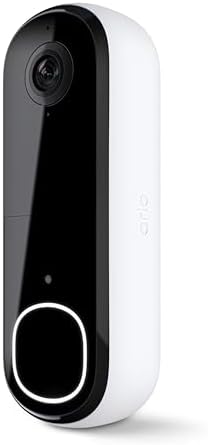
- Video Doorbell Camera for Complete Front Door and Entryway Protection: Monitor your front door with 2K video, person rec…
- Arlo Secure Early Warning System Unlocks Advanced Features: Get 60-day video history, AI detection, and emergency respon…
- Smart Alerts That Keep You Informed: Get notifications for package and pet detection, along with person and vehicle reco…
6. Aqara Doorbell Camera G4 with Chime
Aqara’s Doorbell Camera G400 (Wired) offers 2K clarity, a 165° ultra-wide view, PoE support, existing low-voltage wiring support, and a plug-in chime. Aqara says it can run on PoE for stable performance, or use 8–24V AC/DC existing doorbell wiring for continuous power.
- Who it’s best for: Seniors who want “AI” features like facial recognition without the cloud.
- Main Strengths: Can recognize frequent visitors (like “Daughter” or “Gardener”) and announce them; works with Apple Home, Alexa, and Google; comes with a free chime.
- Possible Limitations: The brand is less “mainstream” in the USA, so support might be harder to find than Ring.
- Recommendation: A powerful choice for those who want their doorbell to tell them exactly who is at the door before they even look at the screen.
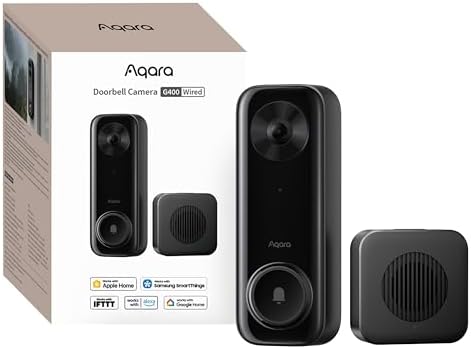
- Works with HomeKit Secure Video and All Major Ecosystems: Fully compatible with Apple HomeKit Secure Video (HSV) for enc…
- 2K HD 165° Head-to-Toe Vision: See everything from packages at your feet to faces at the door. Featuring 2K HD resolutio…
- Reliable Hardwired Power & Stable Wi-Fi 6: You can utilize the high-efficiency PoE connection or reuse your existing 8–2…
READ MORE: Best Fall Detection Smartwatch for Seniors: 2026 Buying Guide & Reviews
Best Video Doorbell Comparison: Finding the Right Fit
To make things even easier, let’s compare these six models side-by-side based on the factors that matter most to seniors.
| Product | Setup Style | Ease of Use | Best Feature for Seniors | Subscription Needed? |
| Ring Battery | Battery (Easy) | High | Works with Alexa | Yes (for recording) |
| REOLINK WiFi | Wired/WiFi | Medium | No Monthly Fees | No |
| Blink Video | Battery (Easiest) | High | 2-Year Battery Life | Optional |
| Google Nest | Wired | Medium | Smart Person Detection | Optional |
| Arlo 2K | Battery/Wired | Medium | Crystal Clear Video | Yes (for recording) |
| Aqara G4 | Battery/Wired | Medium | Facial Recognition | No |
Summary Recommendations:
- Best for Seniors Living Alone: Ring Battery Doorbell. Its reliability and ease of use with voice assistants make it very supportive.
- Best for Caregivers: Google Nest. The ability to accurately identify who is at the door helps caregivers monitor visitors more effectively.
- Best for Low-Maintenance Use: Blink. Changing two AA batteries once every year or two is much easier than recharging a battery pack every three months.
- Best Value for Money: REOLINK. You get high-end features without the “subscription trap.”
READ MORE: Best Medical Alert Systems for Seniors | Top Picks & Reviews
How to Choose the Right One for Your Needs
Before you click “buy,” take a moment to consider your specific living situation. Not every home is the same, and not every senior has the same comfort level with technology.
If You Want a Simple Setup
Go for a wireless doorbell camera for seniors. Devices like the Ring or Blink don’t require you to touch a single electrical wire. You just screw a bracket into the door frame, click the doorbell in, and you’re done. This is also ideal for renters.
If You Dislike Using Too Many Apps
Look for a doorbell that integrates with what you already have. If you have an iPad, a doorbell that supports Apple Home is best. If you have an Echo Show on your nightstand, stick with Ring or Blink. Being able to see the front door on a screen you already use is much easier than learning a brand-new app.
If You Want the Clearest Video
If your eyesight isn’t what it used to be, choose a model with 2K resolution, like the Arlo or Reolink. The higher the resolution, the more you can “pinch and zoom” on the screen to see a face or an ID badge clearly.
If You Live in a Busy Neighborhood
Look for “Activity Zones.” This is a feature in the app that allows you to tell the camera to ignore the sidewalk or the street and only alert you if someone actually steps onto your porch. This prevents your phone from “dinging” every time a car drives by.
READ MORE: Reverse Mortgage Line of Credit Explained: Unlock Your Home Equity
Installation and Setup Tips for Success
Once the box arrives, the setup process is the most important step. If it isn’t set up correctly, it won’t be helpful and it will be frustrating. Here is how to ensure a smooth experience:
- Check Your Wi-Fi First: A video doorbell needs a strong internet signal at the front door. Stand by your door with your phone; if your Wi-Fi signal is low, you might need a “Wi-Fi Extender” to help the doorbell work smoothly.
- The 4-Foot Rule: Mount the doorbell about 48 to 52 inches off the ground. This is high enough to see faces but low enough to catch packages on the ground. It’s also the perfect height for those using wheelchairs or walkers.
- Test the Chime Volume: Don’t just rely on the phone notification. Plug in the indoor chime and set it to a volume and melody that is easily heard over the TV or in the bedroom.
- Enlist a “Tech Helper”: If you aren’t comfortable with apps, ask a child, grandchild, or neighbor to help with the initial sync. Once it’s connected to your phone, the daily use is very simple.
- Label the App: Move the doorbell app to the very first page of your smartphone’s home screen. Give it a clear name or put it in a folder labeled “HOME SAFETY” so you can find it in a hurry.
- Shared Access: Make sure your spouse or your adult children are added as “Shared Users.” This way, if you don’t hear the bell, someone else in the family can check on it for you.
READ MORE: Salvation Army Free Car Program (Eligibility & How to Apply)
Safety and Comfort Benefits
At its core, a video doorbell for seniors is about more than just technology; it’s about the emotional benefit of feeling in control of your environment.
Supporting “Aging in Place”
The goal for many is to stay in their own home as long as possible. Security is a major pillar of that independence. Knowing that you have a “digital eye” on your front door 24/7 reduces the anxiety that can come with living alone.
Less Stress, Better Awareness
The “unknown” is often the greatest source of stress. When someone knocks at 8:00 PM, the uncertainty can be frightening. When you can see it’s just the neighbor returning a borrowed tool, that fear vanishes instantly.
Faster Response Times
If there is an emergency such as a fall or a medical issue and first responders arrive, you can use the two-way talk to tell them how to get in or where the hidden key is. This saves precious seconds when they matter most.
Common Mistakes to Avoid
Even with the best intentions, it’s easy to make a few errors when picking out a doorbell. Keep these in mind:
- Buying Too Much Complexity: You don’t need a doorbell that tracks the “heat map” of your yard. Stick to the basics: see, hear, talk.
- Ignoring the Subscription Cost: Many people buy a $100 doorbell and are surprised they have to pay $5 a month forever to see their videos. Always check if the model requires a subscription.
- Poor Placement: If your doorbell faces a white wall or is in direct, blinding sunlight, the image will be poor. Use a “wedge kit” (usually included) to angle the camera toward the visitor.
- Forgetting the Battery: If you choose a battery model, remember it will die eventually. Set a reminder on your calendar or ask a family member to check the battery level in the app once a month.
Frequently Asked Questions (FAQs)
What is the best video doorbell for seniors?
For most seniors, the Ring Battery Doorbell is the best overall choice due to its simple interface and excellent customer support. However, if you want to avoid monthly fees, the REOLINK WiFi Doorbell is a fantastic alternative.
Are video doorbells easy for older adults to use?
Yes! While the setup might require a little help from a family member, the daily use is as simple as answering a phone call. Most apps are designed with large icons and clear “Accept/Decline” buttons for visitors.
Do seniors need a subscription for a video doorbell?
It depends on the brand. Ring, Arlo, and Nest generally require a subscription (usually $4–$6/month) to save videos. If you just want to see a “live” view of who is at the door, you often don’t need a subscription. Brands like REOLINK and Aqara offer local storage with no monthly fees.
Is a battery or wired video doorbell better for elderly homeowners?
Battery is better for ease of installation and for renters. Wired is better for those who don’t want to worry about ever charging a battery or having the doorbell go “dead” during a busy week.
Can a video doorbell help seniors feel safer at home?
Absolutely. By providing a clear view of the porch, allowing for safe communication without opening the door, and offering a way for family members to check in, a video doorbell is one of the most effective tools for modern home security.
Conclusion
Upgrading your home with a video doorbell for seniors is one of the smartest moves you can make for your safety and peace of mind. It removes the stress of the unknown, prevents unnecessary physical strain, and acts as a constant guardian for your front door.