Living with memory loss or cognitive decline can make keeping track of time a daily challenge. A senior looking at a traditional analog clock might easily see that the hands point to 7:30, yet still feel unsure about whether it is 7:30 in the morning or 7:30 in the evening. They might wonder what day of the week it is, whether an upcoming doctor’s appointment is today or tomorrow, or if they have already eaten breakfast. This constant uncertainty can cause anxiety for older adults and lead to repetitive questions for family members and caregivers.
Dementia clocks for seniors are designed specifically to resolve this confusion. By presenting the time, full day of the week, date, month, and period of the day (such as “Morning” or “Night”) on a single, clutter-free display, these devices offer clear visual orientation at a glance.
Caregiver experiences suggest that a specialized digital calendar clock can serve as a supportive daily aid, helping seniors maintain a sense of routine when visual cues remain helpful. However, cognitive decline affects every individual differently. A clock is an orientation tool rather than a medical device, and its usefulness will depend on the person’s unique stage of memory loss. Lets deep dive into “5 Best Dementia Clocks for Seniors: 2026 Day & Date Guide”
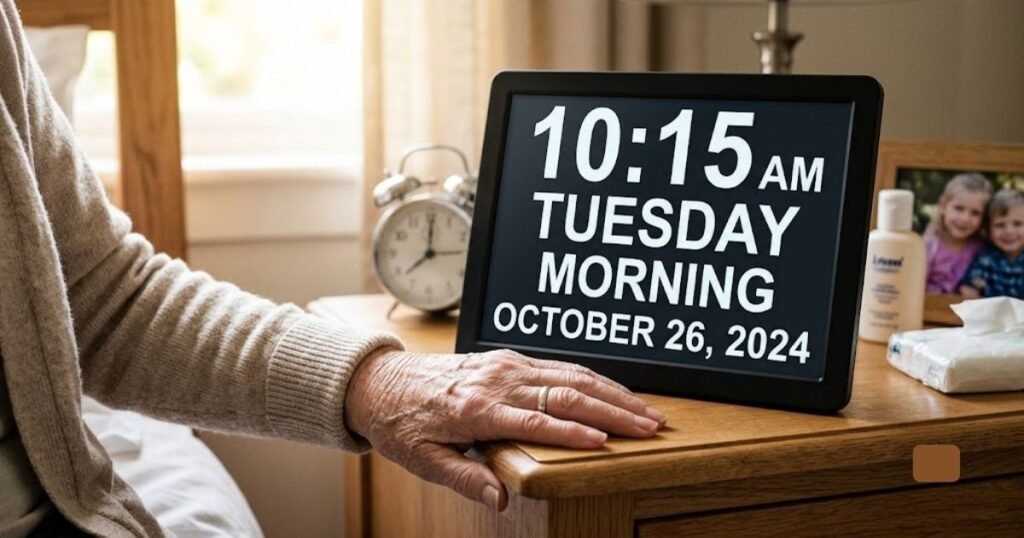
What Is a Dementia Clock?
A dementia clock often referred to as an Alzheimer’s clock or digital calendar clock is a specialized digital display designed to reduce time-related confusion for individuals experiencing memory loss, cognitive impairment, or vision loss.
Unlike a conventional digital clock that only shows numeric hours and minutes, a dementia-friendly clock prioritizes environmental orientation. It translates abstract numbers into clear, context-rich information.
Key Differences: Standard Clocks vs. Dementia Clocks
- Abbreviation-Free Text: Standard digital clocks often abbreviate days and months (e.g., “MON,” “AUG”). Dementia clocks spell out “Monday” and “August” in full, high-contrast lettering, which is significantly easier for an aging brain to process.
- Period of Day Indicators: Many models prominently feature words like “Morning,” “Afternoon,” “Evening,” or “Night” to prevent morning-versus-evening confusion.
- Simplified Layouts: Unnecessary secondary features like flashing colons, complex icon grids, or hard-to-read graphical displays are removed to keep the interface straightforward.
- Automatic Adjustments: Most models include built-in calendar programming that automatically updates for short and long months, leap years, and Daylight Saving Time (DST).
READ MORE: Best Medical Alert Systems for Seniors | Top Picks & Reviews
How Can a Dementia Clock Help Seniors?
Integrating a day and date clock for seniors into a living space provides several functional benefits for both the older adult and their care team:
- Reduces Day/Night Confusion: Clearly stating the period of the day helps prevent individuals from waking up at 8:00 PM and thinking it is time to start the day.
- Clarifies Day and Date: Seeing “Tuesday” spelled out in bold print reduces disorientation regarding daily schedules and upcoming events.
- Supports Daily Routines: Having a constant, reliable time reference makes it easier to track meal times, favorite television shows, and bedtime habits.
- Helps Caregivers Reinforce Schedules: Caregivers can reference the clock when discussing plans (e.g., “We are leaving for your appointment at 2:00 PM Afternoon”).
- Eases Repetitive Questioning: When seniors can independently check the day and time on a clear display, they may feel less inclined to repeatedly ask caregivers for time updates.
- Encourages Independence: Clear environmental cues allow seniors in early-to-moderate stages of memory loss to navigate their daily routines with greater confidence.
- Provides Immediate Wake-Up Orientation: Placing a screen directly across from the bed offers instant reassurance upon waking up from sleep or a afternoon nap.
Optimal Clock Locations in the Home
A dementia clock is most effective when positioned in areas where the senior naturally looks throughout the day:
- The Main Living Room: Near the television or next to a favorite armchair.
- The Bedroom: On a nightstand or mounted on the wall directly opposite the bed.
- The Kitchen or Dining Area: Near the table or main entryway to assist with mealtime orientation.
- Near a Care Calendar: Mounted adjacent to a physical wall calendar or daily schedule board.
RAED MORE: Best Phone for Seniors Hard of Hearing
What Features Should You Look for in a Dementia Clock?
Selecting the right digital clock for seniors with dementia requires evaluating physical display characteristics, menu navigation, and the specific needs of the user.
Large, Easy-to-Read Display
Display size directly impacts visibility. Standard 7-inch to 8-inch screens work well on bedside tables or small desks located within 3 to 5 feet of the viewer. For larger spaces, such as living rooms or open kitchens, a 10-inch to 12-inch screen is far easier to read from across the room.
Full Day and Date Display
Abbreviated text requires cognitive processing that can frustrate someone with memory loss. Seeing “Monday, August 10, 2026” is significantly clearer than reading “MON 8/10/26.”
Time-of-Day Indicators
Look for clocks that display time-of-day categories, typically broken down into four or more blocks:
- Morning (e.g., 6:00 AM – 11:59 AM)
- Afternoon (e.g., 12:00 PM – 4:59 PM)
- Evening (e.g., 5:00 PM – 8:59 PM)
- Night (e.g., 9:00 PM – 5:59 AM)
This context is vital for seniors who experience sleep disturbances or “sundowning” behavior.
High Contrast and Adjustable Colors
Visual decline often accompanies aging. High-contrast color schemes such as bright white text on a deep black background, or amber text on black minimize glare and enhance legibility.
Automatic Brightness / Auto-Dimming
A screen that remains at peak brightness all night can disrupt sleep cycles. Quality dementia clocks feature auto-dimming sensors or scheduled dimming modes that automatically soften the display brightness during nighttime hours (e.g., between 7:00 PM and 7:00 AM).
Automatic Daylight Saving Time (DST)
Manually resetting a digital clock twice a year can be a challenge for seniors and out-of-town caregivers. Models with automatic DST adjustments internally recalculate the time on the correct spring and autumn dates without manual intervention.
Alarm and Reminder Functions
Many modern digital calendar clocks offer built-in alarm schedules. Caregivers can program reminders for:
- Daily meals (Breakfast, Lunch, Dinner)
- Hydration checks
- Favorite TV programs or social activities
- Prescheduled caregiver visits
Battery Backup
In the event of a household power outage, an internal coin-cell battery or backup memory retains the accurate time, date, and alarm settings. When power returns, the clock resumes normal operation without requiring a manual reset.
Wall Mounting vs. Tabletop Placement
Ensure the chosen model includes both a stable fold-out kickstand for desk placement and accessible keyhole slots on the back for secure wall mounting.
Viewing Angle
Clocks equipped with In-Plane Switching (IPS) or high-definition wide-angle screens prevent color distorting or washing out when viewed from the side, which is common when a senior looks at the clock while reclining in a chair.
Ease of Setup
The primary controls should be located on the back or side of the unit with clear button labels. Clocks with straightforward menu systems make initial configuration simple for caregivers.
READ MORE: Best Video Doorbell for Seniors: Wireless, Without Subscription, Easy & Safe
5 Best Dementia Clocks for Seniors
The following non-clinical reviews evaluate five top-rated digital dementia clocks available in 2026. These evaluations are based on advertised features, screen design, usability, and published product specifications.
1. American Lifetime Dementia Clock Large Digital Clock for Seniors
The American Lifetime Large Digital Clock is a widely recognized option for seniors who need a clear, un-cluttered display. Designed with simplicity in mind, it prominently features the full day of the week, period of the day, current time, and complete date in high-contrast text.
Key Specs & Performance
- Display Size: 8 inches (Diagonal)
- Information Shown: Time, Period of Day, Day of Week, Full Date
- Alarms/Reminders: Up to 5 daily alarms plus optional medication prompts
- Special Features: Auto-dimming feature, battery memory backup, multi-language support
Features & Usability
The screen avoids confusing abbreviations and presents crisp white lettering against a dark background. The menu system is navigated via clear control buttons on the back panel, allowing caregivers to quickly toggle between 12-hour and 24-hour time formats or adjust the screen brightness. An integrated auto-dimming sensor lowers the backlight intensity during nighttime hours.
Potential Drawbacks
The 8-inch display screen is best suited for nightstands, desks, or smaller rooms; it may prove too small for viewing across a large living room.
- Pros:
- Clean, abbreviation-free text layout.
- Simple menu navigation for caregivers.
- Reliable battery memory backup for power outages.
- Multiple display color modes on select versions.
- Cons:
- Screen size may be inadequate for large spaces.
- Settings buttons on the back can be sensitive if handled frequently.
Best For: Seniors seeking a simple, high-contrast nightstand or desk clock for daily orientation.
2. JALL 8″ Large Digital Calendar Day Clock for Seniors
The JALL 8-Inch Digital Calendar Day Clock offers a balance of clear visibility, wide viewing angles, and functional scheduling features. It is built to assist older adults who need clean visual prompts throughout the day.
Key Specs & Performance
- Display Size: 8 inches
- Information Shown: Time, Day, Month, Date, Time of Day
- Alarms/Reminders: Multiple programmable alarms with custom reminder labels
- Special Features: Automatic DST adjustment, wide viewing angle, auto-dimming
Features & Usability
JALL’s model utilizes a clear, HD display screen with strong side-angle visibility, making it readable even if the senior is sitting off to the side. The interface provides full spelling for days and months, avoiding confusing numeric codes. It includes automatic Daylight Saving Time adjustments, reducing the need for caregiver maintenance twice a year.
Potential Drawbacks
The power cord must remain continuously plugged in for the display to operate; the internal battery only saves time settings during outages.
- Pros:
- Sharp HD display with broad viewing angles.
- Automatic Daylight Saving Time feature.
- Includes customizable alarm options for daily routines.
- Cons:
- Power adapter cord is required for full operation.
- Frame bezels are slightly wider than modern tablet designs.
Best For: Caregivers looking for a reliable, compact 8-inch calendar clock with automatic time updates.
3. Soobest 12 Inch Dementia Digital Clock for Seniors
For seniors who suffer from macular degeneration or significant visual decline, standard 8-inch screens may still prove difficult to read. The Soobest 12-Inch Clock provides an oversized screen that makes reading text effortless from across a large room.
Key Specs & Performance
- Display Size: 12 inches (Diagonal)
- Information Shown: Large Time, Period of Day, Full Date
- Alarms/Reminders: Up to 20 customizable alarm/reminder slots on newer versions
- Special Features: Extra-large typography, wall-mounting template, automatic dimming
Features & Usability
The primary advantage of the Soobest 12-inch model is scale. The characters are double the size of standard tabletop units, allowing seniors to check the time and date without leaving their chair or wearing reading glasses. Newer iterations include up to 20 customizable daily reminder alerts, assisting with daily schedule prompts.
Potential Drawbacks
The physical dimensions require more table space or dedicated wall real estate. The larger screen illuminated at night may also produce too much ambient light for sensitive sleepers if placed on a nearby nightstand.
- Pros:
- Exceptional visibility from across large living areas.
- Large font size is ideal for vision-impaired seniors.
- Robust selection of alarm and schedule reminders.
- Cons:
- Larger physical footprint requires adequate counter or wall space.
- May be excessively bright for small bedrooms.
Best For: Seniors with vision challenges or for placement in large living rooms and open kitchens.
4. SSYA Dementia Clock for Seniors
The SSYA Dementia Clock emphasizes clarity, color contrast options, and broad language support. It is designed to assist older adults who benefit from straightforward, high-definition text displays.
Key Specs & Performance
- Display Size: 10 inches (Select variants available in 8″)
- Information Shown: Time (12/24 HR), Day of Week, Date, Month, Time of Day
- Alarms/Reminders: Multiple alarm settings with variable volume controls
- Special Features: HD screen resolution, multi-language UI, custom color modes
Features & Usability
The SSYA clock features a high-definition screen that displays bold, non-abbreviated text in white, yellow, or multi-color configurations. Caregivers can select high-contrast modes to improve readability for individuals with color vision changes. The system supports multiple user languages, making it a good option for non-English speaking households.
Potential Drawbacks
Some secondary custom layout themes can display extra text on screen, which may distract users who require a minimalist display.
- Pros:
- Clear 10-inch screen strikes a middle ground between size and placement flexibility.
- Selectable color themes improve visual contrast.
- Multilingual menu and text options.
- Cons:
- Certain secondary display screens contain extra visual detail.
- Remote control (if included on specific versions) can be misplaced.
Best For: Multilingual families or seniors who benefit from adjustable text colors and moderate screen sizing.
5. Raynic Digital Clock, 10.1 Inch Large Display Calendar Clock
The Raynic 10.1-Inch Clock provides a modern, feature-rich display designed for caregivers who want detailed environmental tracking along with custom daily schedule prompts.
Key Specs & Performance
- Display Size: 10.1 inches
- Information Shown: Time, Day, Full Date, Time of Day, Indoor Temperature & Humidity
- Alarms/Reminders: Up to 20 unique alarms and scheduling prompts
- Special Features: 12 display themes, indoor environmental sensors, extensive reminder options
Features & Usability
The Raynic model combines traditional orientation features with extra data, such as real-time indoor room temperature and relative humidity. It boasts up to 20 individual alarms and reminders that can display text prompts for recurring daily routines. With 12 selectable screen themes, caregivers can choose between simple layouts or multi-data dashboards.
Potential Drawbacks
The inclusion of temperature and humidity data can create visual clutter. For seniors in advanced stages of memory loss, too many numbers on screen can lead to confusion.
- Pros:
- Comprehensive reminder system with up to 20 alarms.
- Displays room temperature and humidity for environmental monitoring.
- Multiple display layout themes.
- Cons:
- Additional environmental metrics may overcomplicate the display for some users.
- Setup menu takes longer to program due to the expanded feature set.
Best For: Early-stage seniors or caregivers who prefer expanded daily schedule prompts and ambient room tracking.
READ MORE: Best 5 Raised Toilet Seat with Handles: Reviews, Comparison & Cost
Dementia Clocks for Seniors Comparison Table
(Note: Features and specific options may vary depending on the product model and retailer listing. Check current product listings for exact specifications.)
| Product | Display Size | Day / Date Display | Alarms & Reminders | Auto-Dimming | Key Strength | Best For |
| American Lifetime | 8″ | Full non-abbreviated text | Up to 5 alarms + custom prompts | Yes | Minimalist, user-friendly design | Nightstand or small desk orientation |
| JALL Digital Clock | 8″ | Full non-abbreviated text | Multiple daily alarms | Yes | Wide viewing angles & auto DST | Dependable, mid-sized everyday use |
| Soobest 12-Inch | 12″ | Full non-abbreviated text | Up to 20 schedule reminders | Yes | Extra-large, high-visibility screen | Seniors with low vision or large rooms |
| SSYA Clock | 10″ | Full non-abbreviated text | Multiple alarms with volume control | Yes | Multilingual options & text colors | Non-English speakers & contrast adjustments |
| Raynic 10.1-Inch | 10.1″ | Full non-abbreviated text | Up to 20 alarms & reminders | Yes | Temperature/humidity + 12 screen themes | Feature-rich scheduling & environment tracking |
Which Dementia Clock Is Best for Different Needs?
Every senior has unique physical, visual, and cognitive requirements. Rather than choosing one universal model, consider which device matches the specific setup and need:
- Best for Overall Simplicity & Bedside Use: American Lifetime 8-Inch
Provides essential orientation information without cluttered icons or complex setups. - Best Compact Option with Auto-DST: JALL 8-Inch
Ideal for caregivers who want reliable timekeeping and simple time zone adjustments. - Best for Low Vision & Large Living Areas: Soobest 12-Inch
Offers maximum font size for viewing across living rooms or open floor plans. - Best Value & Color Customization: SSYA 10-Inch
Great for families seeking adjustable contrast combinations or multi-language displays. - Best for Detailed Reminders & Schedules: Raynic 10.1-Inch
Well-suited for structured daily schedules and monitoring indoor room comfort.
READ MORE: Best 7 Brain Health Supplements for Seniors’ Memory & Focus
7 Things to Consider Before Buying a Dementia Clock
Before making a purchase, evaluate these practical considerations to select the right device for your loved one’s living space:
- Viewing Distance and Screen Sizing
Determine where the clock will be situated. An 8-inch clock works well at a distance of 3 to 4 feet (e.g., a bedside nightstand). If the clock will be mounted on a living room wall 10 to 15 feet away, select a 10-inch or 12-inch display. - Current Visual Clarity and Color Contrast
Evaluate whether the senior struggles to distinguish dark blue text from black backgrounds. High contrast white or bright yellow lettering on a matte black background is generally the easiest layout for aging eyes to read. - Presence of AM/PM Disorientation
If the senior routinely confuses morning with evening, select a clock that explicitly spells out “MORNING,” “AFTERNOON,” “EVENING,” or “NIGHT” in prominent text. - Need for Full Text vs. Abbreviation
Ensure the device spells out the full day of the week and month (e.g., “Wednesday, October” rather than “WED, OCT”). - Practical Utility of Alarms
Consider whether audio alarms will be helpful or startling. If the senior finds sudden beeping sounds distressing, look for models with adjustable alarm volume or visual screen prompts. - Caregiver Setup Requirements
Seniors experiencing cognitive decline should not be expected to program or adjust the clock themselves. Look for units that feature rear-facing buttons or simple menus that caregivers can easily configure during a visit. - Room Lighting and Nighttime Sensitivity
Ensure the clock has a reliable auto-dimming mode so that a bright screen does not disrupt the senior’s sleep in a dark bedroom.
How to Set Up a Dementia Clock for a Senior
Follow these simple steps when setting up a new digital calendar clock:
- Choose a Stable, Familiar Location: Select a spot in the living room or bedroom where the senior naturally spends time.
- Connect the Power Supply: Plug the power adapter into an outlet that is not controlled by a wall switch to avoid accidental shut-offs.
- Set the Current Time, Date, and Year: Enter the menu to set the accurate local time and date. Verify that the AM/PM indicator is correct.
- Choose the Simplest Display Layout: Select a high-contrast theme that shows only the time, day of the week, full date, and time of day. Turn off unnecessary widgets like temperature or humidity if they distract from the primary time display.
- Set the Auto-Dimming Feature: Program the screen to lower its brightness during nighttime hours (e.g., from 8:00 PM to 7:00 AM) to preserve a dark sleeping environment.
- Program Essential Reminders Only: Avoid setting too many alarms at once. Limit audio/visual prompts to one or two daily routines (such as lunch or bedtime) to prevent alarm fatigue.
- Observe and Adjust: Monitor how your loved one interacts with the clock over the first two weeks. If they seem confused by certain colors or icons, adjust the menu settings to simplify the screen display.
READ MORE: Best Smart Pill Dispensers for Medication for Seniors
Dementia Clock vs. Regular Digital Clock
Understanding how specialized calendar clocks differ from standard household digital clocks helps highlight their utility for seniors experiencing memory loss.
| Feature | Dementia / Calendar Clock | Standard Digital Alarm Clock |
| Time Display | Extra-large, high-contrast numbers | Small to medium digits |
| Day of the Week | Fully spelled out (e.g., “Wednesday”) | Abbreviated (e.g., “WED”) or missing |
| Full Date Format | Fully spelled out (e.g., “August 12, 2026”) | Numeric short-code (e.g., “8/12”) or missing |
| Time-of-Day Context | Explicitly displays “MORNING,” “NIGHT,” etc. | Shows simple AM/PM indicator or small dot |
| Auto-Dimming | Built-in ambient sensor / scheduled dimming | Rare or manual button press only |
| Interface Design | Minimalist layout focused on orientation | Often includes flashing icons, radio bands, etc. |
| Primary Goal | Contextual environmental orientation | Basic time display and wake-up alarm |
Can a Dementia Clock Help With Sundowning?
“Sundowning” refers to a state of heightened confusion, anxiety, and restlessness that some individuals with dementia experience in the late afternoon and early evening. As natural light fades, people with cognitive decline may feel disoriented, wander, or repeatedly ask to “go home.”
A digital day and date clock can support caregivers managing sundowning behaviors by serving as a visual reference point. When a senior wakes up or becomes disoriented during twilight hours, seeing “EVENING” or “NIGHT” clearly printed on an illuminated screen provides a concrete visual cue about the time of day.
Note: A dementia clock is an environmental cue, not a medical treatment for sundowning or cognitive decline. If a senior experiences severe anxiety, agitation, or sleep disruption in the evening, consult a qualified healthcare professional for guidance.
Are Dementia Clocks Worth It?
For many families and professional caregivers, a specialized digital clock is a helpful, low-cost addition to a senior’s home.
When They Are Most Helpful
- Early to Moderate Dementia: When the individual can still read and process written words, a calendar clock offers constant orientation reassurance.
- Frequent Day/Date Disorientation: Helpful for seniors who repeatedly ask what day of the week it is or whether an upcoming event is today.
- AM/PM Confusion: Useful for individuals who wake up from naps disoriented about whether it is morning or evening.
When Expectations Should Be Limited
- Advanced Stage Dementia: In later stages of cognitive decline, individuals may lose the ability to interpret written text, read traditional numbers, or understand screen displays.
- Severe Visual Processing Issues: If a senior can no longer process visual information from screens, a clock will offer limited benefit.
Ultimately, caregiver experiences vary widely. While many families find that a day and date clock reduces daily stress and repeated questions, others find that their loved one eventually stops interacting with the display as their condition progresses.
Frequently Asked Questions
What is the best dementia clock for seniors?
The best dementia clock depends on the senior’s visual capabilities, room size, and cognitive needs. For standard bedside placement, an 8-inch screen like the American Lifetime or JALL clock offers clear, non-abbreviated day and date information. For large living rooms or seniors with vision impairment, a larger 10-inch or 12-inch model like the Soobest provides superior visibility from across the room.
What is the best clock for someone with Alzheimer’s?
The ideal clock for someone living with Alzheimer’s disease features high-contrast text, full non-abbreviated spelling of the day and month, and clear period-of-day indicators (such as “MORNING” or “NIGHT”). Minimalist displays that eliminate clutter are generally easier to interpret. A dementia clock functions as an environmental orientation aid rather than a clinical treatment.
Do dementia clocks really work?
Dementia clocks are effective orientation tools for many seniors in early to moderate stages of memory loss who retain reading comprehension. They provide immediate visual reassurance regarding the day, date, and time of day, which can reduce anxiety and lessen repetitive questions for caregivers. However, as cognitive impairment advances to later stages, a senior’s ability to interpret written screens may diminish.
What should a dementia clock display?
A well-designed dementia clock should display:
The current time in large, high-contrast numbers (with AM/PM indicators).
The full day of the week spelled out completely.
The complete calendar date and month.
The period of the day (e.g., “MORNING,” “AFTERNOON,” “EVENING,” or “NIGHT”).
What is the easiest digital clock for an elderly person?
The easiest digital clock for an older adult is one that works right out of the box with minimal setup, features a large screen with bright white or yellow lettering on a dark background, spells out all words without confusing abbreviations, and automatically adjusts for Daylight Saving Time.
Final Verdict
When choosing a dementia clock for a senior, focus on clarity and ease of use rather than extra features. The most effective clock is not necessarily the one with the most settings, but the one your loved one can easily see, understand, and use in their daily routine.
For compact spaces like nightstands or small desks, an 8-inch display with full day and date spelling offers clear orientation without taking up too much room. In contrast, open living rooms or homes with vision-impaired seniors benefit from larger 10-inch or 12-inch screens mounted at eye level.