Choosing a cell phone for an aging parent, grandparent, or yourself can feel more complicated than it should be. Most phones on the market are built for people who grew up swiping and pinching-to-zoom — not for someone who wants to make a call, send a text, and know that help is one button away.
That’s the gap this guide closes. Whether you’re shopping for a first-time flip phone, a simplified Android smartphone, or a big-button device with a dedicated SOS key, the right choice comes down to a handful of things that actually matter for older adults:
- Simplicity — a home screen and menu that don’t require a manual
- Large displays and text — so nothing needs to be squinted at
- Big, tactile buttons — for arthritis, tremors, or reduced dexterity
- Hearing aid compatibility (HAC) — for clear, feedback-free calls
- Emergency features — SOS buttons, urgent response services, and location sharing
- Battery life — long standby time so charging isn’t a daily chore
- Affordability — many seniors are on fixed incomes, so value matters as much as features
Below, we break down seven of the most talked-about senior phones on the market right now from ultra-simple picture-dial flip phones to fully capable Android smartphones so you can match the right device to the right person. Lets deep dive into “Best Cell Phone for Seniors Easy to Use (2026)”

How We Selected These Phones
We looked at official manufacturer specifications, pricing pages, and accessibility documentation, then cross-referenced them against user reviews and independent tech coverage. Each phone was evaluated on the factors that matter most to older adults and their caregivers:
- Ease of use and menu simplicity
- Screen visibility and text size
- Call quality and speaker loudness
- Battery life and standby time
- SOS and emergency-response functionality
- Accessibility features (hearing aid compatibility, voice assistants, captions)
- Build durability
- Overall value relative to price
- Real-world customer satisfaction and complaint patterns
Phones that required a confusing setup, had unreliable emergency features, or scored poorly on accessibility were left off the list — even if they were popular sellers.
READ MORE: Best Flip Phone for Seniors: 7 Easy-to-Use Picks
What Makes a Cell Phone Easy for Seniors?
Not every “senior phone” actually delivers on that promise. Here’s what separates a genuinely easy device from one that just looks simple in a product photo:
- Large icons and simple menus that avoid nested settings and jargon
- Loud, clear speakers with hearing aid compatibility (look for an HAC rating)
- Physical buttons with good tactile feedback for people with arthritis or tremors
- Voice assistants for hands-free calling, texting, and reminders
- A dedicated emergency SOS button that dials multiple contacts automatically
- Long battery life so the phone doesn’t need daily charging
- A simple charging dock instead of a fiddly cable and port
- Easy texting, including T9 predictive text or large-key typing
- Medical alert compatibility or built-in urgent response services
- Picture contacts for one-touch calling without reading names
- Bright, high-contrast displays that stay legible in daylight
Keep this checklist in mind as you read the reviews below the “best” phone is really the one that checks the most boxes for the specific person who’ll be using it every day.
READ MORE: Best Landline Phone for Seniors: Top 6 Reviewed
Best Cell Phone for Seniors Easy to Use (2026): Review
1. Motorola Moto G Play (2026) – Best Budget Smartphone
Product Overview
The Motorola Moto G Play (2026) is an affordable full-featured Android device. It is ideal for tech-literate seniors who want a modern smartphone experience including video calling, web browsing, and photo sharing without paying flagship prices.
Key Features & Performance
- Display: 6.7-inch HD+ LCD display with a smooth 120Hz refresh rate and up to 1,000 nits of peak brightness for outdoor readability.
- Battery Life: Massive 5,200mAh battery providing up to 2 full days of moderate usage per charge.
- Interface: Near-stock Android software, allowing you to easily enable simplified launchers, extra-large fonts, and Android’s native Emergency SOS options.
- Hardware: Side-mounted fingerprint sensor built into the power button, 3.5mm headphone jack, and a textured, grip-friendly back panel.
Senior Accessibility Features
Android’s built-in accessibility menu allows caregivers to scale font sizes up to 200%, enable high-contrast text, activate voice controls via Google Assistant, and turn on real-time call captioning. The large 6.7-inch screen gives users plenty of room for typing messages.
Pros & Cons
- Pros:
- Exceptional multi-day battery endurance.
- Large, smooth screen that is easy on aging eyes.
- Modern USB-C port with a headphone jack for wired headsets.
- Works unlocked across all major U.S. carriers.
- Cons:
- Lacks a dedicated physical SOS safety button.
- Takes up more pocket space than a flip phone.
- Best For: Seniors who want a reliable, big-screen smartphone experience for video calls and apps on a budget.
- Value for Money: Excellent

2. BLU G35 (2025) – Best Value Unlocked Smartphone
Product Overview
The BLU G35 (2025) offers essential smartphone features in a lightweight package. Running Android 14 (Go Edition), it features a clean interface that simplifies navigation and reduces background processing strain.
Key Features & Performance
- Display: 6.5-inch HD+ display with a 20:9 aspect ratio, offering ample space for reading text and viewing family photos.
- Build & Storage: Lightweight design (184g) with a textured plastic back cover, 32GB internal storage (expandable via microSD up to 256GB), and 3GB RAM.
- Software: Android 14 Go Edition keeps the system interface simple and easy to use.
Senior Accessibility Features
Because it runs a clean version of Android, the BLU G35 makes it easy to install senior-friendly launcher apps (such as BIG Launcher or Simple Mode). This transforms the home screen into a plain grid with large, colorful buttons for Phone, Messages, Photos, and Contacts.
Pros & Cons
- Pros:
- Very affordable price point (often under $70).
- Factory unlocked for T-Mobile, AT&T, and compatible MVNO networks.
- Lightweight plastic body is comfortable to hold for long calls.
- Cons:
- 3,000mAh battery requires daily charging under moderate use.
- Basic camera performance in low-light environments.
- Best For: Budget-conscious older adults looking for an unlocked, lightweight Android phone.
- Value for Money: Unbeatable entry-level price.

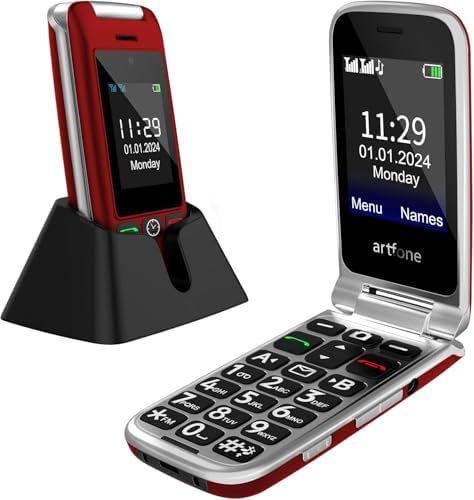
3. artfone G6 4G Flip Phone – Best Budget SOS Flip Phone
Product Overview
The artfone G6 is designed specifically for seniors who want a straightforward cell phone without smartphone complications. Featuring a traditional flip design, it keeps the keypad protected inside while showing incoming caller information on the outer display.
Key Features & Performance
- Dual Displays: 2.4-inch primary color inner display combined with a 1.8-inch external screen for quick checks on the time, battery level, and incoming calls.
- Tactile Keypad: Extra-large, rubberized buttons with clear white numbering on a high-contrast dark background.
- Emergency System: Prominent rear SOS button that alerts up to 5 emergency contacts in sequence when pressed.
- Charging Dock: Comes bundled with a drop-in cradle, making charging simple without worrying about tiny cables.
Senior Accessibility Features
The artfone G6 features amplified speaker output, loud ringers, speed-dial keys (A/B keys plus 1–9 speed dials), and a side-mounted physical LED flashlight switch.
Pros & Cons
- Pros:
- Dedicated physical emergency SOS button on the back.
- Included desktop charging dock simplifies daily charging.
- Clear dual-screen setup lets you see who is calling before opening.
- Cons:
- Basic, low-resolution 0.3MP camera.
- Proprietary feature-phone software (no apps or video calling).
- Best For: Elderly users who want a simple flip phone with a physical emergency panic button.
- Value for Money: Excellent budget value ($40–$55).
4. VAHVARNA Oasis M1 4G – Best Extra-Loud Flip Phone
Product Overview
The VAHVARNA Oasis M1 4G is designed for older adults dealing with age-related hearing loss or vision difficulties. It combines a durable, drop-resistant flip shell with amplified audio drivers and high-contrast physical keys.
Key Features & Performance
- Amplified Audio: Earpiece and speakerphone drivers output higher decibel levels, making it easier to hear conversations even in noisy rooms.
- Display & Keypad: Bright 2.8-inch internal display paired with a outer screen for caller ID, time, and missed call notifications. The large, widely-spaced keys help prevent accidental button presses.
- Safety Features: Built-in rear SOS panic button, M4/T4 hearing aid compatibility rating, and a side flashlight switch.
Senior Accessibility Features
The Oasis M1 features simplified menu navigation with high-contrast text and voice-guided key dialing (the phone reads aloud each button number as it is pressed).
Pros & Cons
- Pros:
- High-volume speakerphone and clear earpiece audio.
- Simple flip answer/hang-up functionality.
- Dedicated SOS button and speed dial setup.
- Cons:
- Menu design feels slightly dated.
- Limited internal storage for media files.
- Best For: Seniors with mild-to-moderate hearing loss who prefer a loud, simple flip phone.
- Value for Money: Great value for a specialized 4G accessibility phone.
5. Easyfone Prime-T6 4G – Best Picture-Dial Phone for Cognitive Support
Product Overview
The Easyfone Prime-T6 4G is designed for seniors experiencing early-stage dementia, Alzheimer’s, or severe memory loss. Instead of navigating phonebooks or typing out phone numbers, users can dial close contacts simply by pressing a physical photo button.
Key Features & Performance
- Picture Dialing Interface: Dedicated physical speed-dial keys allow family members to insert printed photos of loved ones under clear protective covers.
- Dock Charging: Includes a drop-in charging cradle to ensure the device stays charged without cable hassles.
- Caregiver Assistance: Simple menu options allow family members to set up medication reminders, alarm notifications, and whitelist authorized callers to block spam.
Senior Accessibility Features
Equipped with an emergency SOS key, high-decibel speaker output, Hearing Aid Compatibility, and a simple menu structure that hides advanced settings away from accidental changes.
Pros & Cons
- Pros:
- Physical picture buttons make dialing simple for users with memory loss.
- Drop-in cradle prevents battery depletion issues.
- Whitelist calling blocks unwanted telemarketers and spam.
- Cons:
- Basic display screen size and layout.
- Photo inserts must be manually printed and placed under button covers.
- Best For: Older adults with cognitive decline, memory challenges, or severe vision loss.
- Value for Money: Excellent value for specialized caregiving needs.

6. LIVELY Jitterbug Smart4 – Best Senior Smartphone with Emergency Services
Product Overview
The LIVELY Jitterbug Smart4 is widely considered the gold standard for senior smartphones in the United States. Combining modern Android capabilities with a simple text-based list menu, it bridges the gap between smart features and user-friendly operation.
Key Features & Performance
- Display: Large 6.7-inch display featuring bright contrast, bold fonts, and a vertical list menu instead of confusing app icons.
- Safety & Caregiver Services: Operates on the Lively network (utilizing Verizon’s coverage). Access 24/7 Urgent Response monitoring, live nurse hotlines, and real-time GPS location tracking through the Lively Link app for caregivers.
- Voice Control: Full integration with Google Assistant allows users to send texts, dial contacts, or check weather forecasts using voice commands.
Senior Accessibility Features
Lively’s specialized software includes screen magnifier options, real-time typing options, high-decibel clear voice earpiece speakers, and direct one-touch access to certified emergency response operators.
Pros & Cons
- Pros:
- Intuitive list menu design eliminates app confusion.
- Direct access to 24/7 urgent emergency agents and telehealth support.
- Excellent coverage across the U.S. via Verizon’s network.
- Cons:
- Requires subscription to a Lively service plan.
- Monthly health and emergency monitoring packages add to total ownership cost.
- Best For: Older adults who want a modern smartphone experience backed by emergency safety services.
- Value for Money: High value for families seeking built-in safety monitoring.

7. LIVELY Jitterbug Flip2 – Best Senior Flip Phone with Emergency Services
Product Overview
For seniors who prefer a classic phone style, the LIVELY Jitterbug Flip2 provides an easy-to-use flip design. It features a bright display, extra-large backlit buttons, simple “Yes” and “No” navigation keys, and full integration with Lively’s health and safety monitoring network.
Key Features & Performance
- Hardware & Keys: Features a large physical keypad with brightly illuminated numbers, clear tactile separation, and simple menu keys.
- Voice Assistant: Built-in Amazon Alexa integration allows users to make phone calls, write text messages, set reminders, and check weather updates hands-free.
- Emergency Response: Features a dedicated Urgent Response button right on the keypad for fast access to monitoring center agents.
Senior Accessibility Features
Offers an extra-loud speakerphone, M4/T4 hearing aid compatibility rating, simple list-style menus on its main internal display, and a sturdy outer shell that stands up to occasional drops.
Pros & Cons
- Pros:
- Simple “Yes/No” interface makes navigation simple.
- Alexa integration allows hands-free voice commands.
- Direct access to emergency response agents.
- Cons:
- Tied to Lively network plans.
- Higher monthly cost compared to standard unlocked prepaid carriers.
- Best For: Non-tech-savvy seniors seeking a basic flip phone backed by 24/7 medical alert monitoring.
- Value for Money: Outstanding safety investment for non-smartphone users.

READ MORE: Best Cordless Phone for Seniors: Top 5 Easy-to-Use Home Phones
Cell Phone Comparison Table
| Phone | Type | Screen Size | SOS Button | Large Buttons | HAC | Picture Dial | Carrier | Best For |
| Motorola Moto G Play | Smartphone | 6.7″ | No | No | Varies | No | Unlocked | Budget Android |
| BLU G35 (2025) | Smartphone | 6.5″ | No | No | Varies | No | Unlocked (GSM) | Affordable large screen |
| artfone G6 | Flip phone | 2.4″+1.8″ | Yes | Yes | No | Yes | Unlocked (4G) | Large-button simplicity |
| VAHVARNA Oasis M1 | Flip phone | 2.8″+1.5″ | Yes | Yes | Yes | No | Unlocked (GSM) | Accessibility needs |
| Easyfone Prime-T6 | Feature phone | Small display | Yes | N/A (picture buttons) | Yes | Yes | T-Mobile/SpeedTalk/Tello | Dementia-friendly calling |
| LIVELY Jitterbug Smartphone | Smartphone | Large touchscreen | Yes (w/ plan) | No | Yes | No | Lively (Verizon MVNO) | Smartphone + safety net |
| LIVELY Jitterbug Flip | Flip phone | Large display | Yes (w/ plan) | Yes | Yes | No | Lively (Verizon MVNO) | Simple flip + safety net |
Pros & Cons Comparison
| Phone | Biggest Pro | Biggest Con |
| Motorola Moto G Play | Best value for a real smartphone | No dedicated SOS button |
| BLU G35 | Unlocked flexibility, big display | No senior-specific features |
| artfone G6 | Genuine SOS with sequential dialing | Basic camera and storage |
| VAHVARNA Oasis M1 | Deepest accessibility settings | Smaller app ecosystem (KaiOS) |
| Easyfone Prime-T6 | Nearly foolproof for memory-impaired users | Very limited carrier options |
| LIVELY Jitterbug Smartphone | Full smartphone plus urgent response service | Locked to Lively/Verizon |
| LIVELY Jitterbug Flip | Zero learning curve, Alexa built in | No data plan, monthly cost |
READ MORE: Best Phone for Seniors Hard of Hearing
Which Phone Is Best for Different Seniors?
- Poor eyesight: Motorola Moto G Play or BLU G35 — both offer large, bright displays with adjustable text size.
- Hearing impairment: VAHVARNA Oasis M1 or LIVELY Jitterbug Flip — both are HAC-rated with loud, clear speakers.
- Arthritis or tremors: artfone G6 or VAHVARNA Oasis M1 — large, well-spaced backlit buttons reduce mis-presses.
- Dementia or memory loss: Easyfone Prime-T6 — picture-dial calling removes the need to search a phonebook.
- First smartphone: LIVELY Jitterbug Smartphone — simplified Android with guided support.
- Budget buyers: Motorola Moto G Play — the best specs-to-price ratio on this list.
- Emergency preparedness: LIVELY Jitterbug Smartphone or Flip — professionally monitored Urgent Response service.
- Simple calling only: artfone G6 or Easyfone Prime-T6.
- Video calls with family: LIVELY Jitterbug Smartphone or Motorola Moto G Play.
- Caregivers coordinating care: LIVELY Jitterbug phones — Lively Link sends alerts directly to family members.
Smartphone vs. Flip Phone: Which Should Seniors Choose?
Advantages of Senior Flip Phones
- Physical Tactile Feedback: Raised keys let users feel numbers as they dial.
- Simplified Interaction: Opening the flip answers a call; closing it hangs up.
- Durability: The folding design protects the primary screen from glass scratches or cracks during accidental drops.
- Extended Standby Battery: Without power-hungry app processors, basic flip phones can last 5 to 10 days on standby.
Advantages of Senior Smartphones
- Family Video Calls: Enables high-definition video calls via Zoom, FaceTime, or WhatsApp, helping loved ones stay visually connected across distances.
- Voice Assistants: Users can command the phone hands-free (“Call Sarah,” “Read my text,” or “Set a medicine alarm”).
- Medical & Navigation Apps: Allows older adults to manage prescriptions, check health metrics, and use GPS navigation.
Who should buy each: Choose a smartphone if the senior already uses email or texts regularly and wants video calls with family. Choose a flip phone if the priority is simplicity, safety, and avoiding a learning curve entirely especially for someone with memory or vision challenges.
READ MORE: Best iPhones for Seniors: 7 Easy-to-Use Phones
Accessibility Features Seniors Should Look For
- Larger fonts and display zoom for readability without a magnifier
- Voice assistants (Google Assistant, Alexa, or built-in equivalents) for hands-free use
- Hearing aid compatibility (HAC) rated speakers for feedback-free calls
- Real-time captions for phone calls or videos
- Emergency SOS with automatic multi-contact dialing
- Medical ID accessible from the lock screen for first responders
- Picture contacts for one-touch, name-free calling
- Speed dial to reach the most important people instantly
- Voice typing for texting without a keyboard
- Wi-Fi calling for better indoor reception
- 4G/5G compatibility to avoid outdated, soon-to-be-retired 3G networks
Senior Cell Phone Buying Guide
Budget: Basic flip and picture-dial phones typically run $40–$90, while simplified smartphones like the Jitterbug Smart4 and budget Android phones land between $100–$200.
Carrier compatibility: Unlocked phones (like the Motorola, BLU, artfone, and VAHVARNA models) work with almost any GSM carrier — AT&T, T-Mobile, Cricket, Mint, and others giving you plan flexibility. Lively’s Jitterbug phones only work on Lively’s own Verizon-based network, which trades flexibility for an integrated safety-service package.
Unlocked vs. carrier-locked: Unlocked phones let you shop for the cheapest compatible plan. Carrier-locked phones bundle hardware and service together, which can simplify the decision for less tech-savvy shoppers.
Other factors: Prioritize at least a full day of battery life, a minimum one-year warranty, and accessible U.S.-based customer support. A cradle-style charging dock is far easier than a fiddly cable, and a protective case plus screen protector (for touchscreen models) are cheap insurance against drops.
READ MORE: Best Smart TV for Seniors: Easy to Use & Large Screen Picks
Common Mistakes to Avoid
- Buying an overly complicated flagship phone because it was “on sale” — extra features often mean extra confusion.
- Ignoring hearing aid compatibility, which can make or break call clarity.
- Choosing tiny buttons on a “senior phone” that isn’t actually built with larger keys.
- Skipping emergency features like SOS buttons, which matter most during a fall or medical event.
- Buying an outdated 3G-only phone — most 3G networks in the U.S. have been shut down, making these phones useless.
- Ignoring software updates, since a phone that no longer receives security patches is a real risk for banking or health apps.
Expert Tips for Setting Up a Senior’s Phone
- Enable larger text and display zoom in accessibility settings right after setup
- Increase icon size and remove unused apps from the home screen
- Program emergency contacts and test the SOS or Urgent Response feature before handing over the phone
- Turn on spam and robocall protection
- Keep the home screen to essentials only: Phone, Messages, Camera, and one or two favorites
- Enable the voice assistant and practice a few sample commands together
- Place the charging dock somewhere visible, like a kitchen counter
Final Verdict
For most families, the LIVELY Jitterbug Smartphone is the best all-around choice it balances real smartphone functionality with a genuinely useful emergency response service. Seniors who want zero learning curve should look at the LIVELY Jitterbug Flip or artfone G6. Budget shoppers get the most value from the Motorola Moto G Play, while seniors with combined vision, hearing, or dexterity needs are best served by the VAHVARNA Oasis M1. For anyone supporting a loved one with memory loss, the Easyfone Prime-T6‘s picture-dial simplicity is hard to beat.
Frequently Asked Questions
What is the easiest cell phone for seniors to use?
For non-tech-savvy seniors who want simple calling, flip phones like the LIVELY Jitterbug Flip2 or artfone G6 are the most intuitive options. For older adults who prefer a touchscreen for photos and video calls, the LIVELY Jitterbug Smart4 offers a clean, text-based list menu that replaces standard app clutter.
Which phone is best for seniors with poor eyesight?
The Motorola Moto G Play and BLU G35 both offer sizable 6.5–6.7-inch screens with adjustable display settings, while the LIVELY Jitterbug Smartphone uses an interface specifically designed with larger icons and text for low-vision users.
Is a flip phone or smartphone better for older adults?
Flip phones are better for seniors who want maximum simplicity, physical buttons, and no risk of accidentally changing settings on a touchscreen. Smartphones are better for seniors who want video calls, photo sharing, GPS, and app access, and who are comfortable with at least basic touchscreen navigation.
What is the best unlocked phone for seniors?
The Motorola Moto G Play stands out as the best unlocked smartphone option for seniors due to its large display, strong battery life, and budget-friendly price. For an unlocked flip phone, the artfone G6 offers large buttons, dual screens, and a genuine SOS function while remaining compatible with most GSM carriers.
Does Medicare pay for cell phones for seniors?
Standard Medicare (Part A and Part B) does not cover cell phones or monthly wireless plans. However, some private Medicare Advantage (Part C) plans offer supplementary wellness benefit allowances or special needs allowances that help cover medical alert systems or basic cell phones.