If you applied for the federal Lifeline discount and got hit with a “duplicate household” or “duplicate address” error, take a breath. This happens to thousands of honest applicants every month, and it almost never means you did something wrong. It usually just means the system found someone else tied to your address, and it needs you to prove your household is your own.
Seniors run into this error more often than most applicants. Many live with an adult child, share a mailing address with a sibling, live in a multi-unit senior building, or moved recently and still show up under an old address in government databases. None of that automatically disqualifies you it just means you’ll likely need to fill out one extra form.
In this guide, you’ll learn exactly what causes a duplicate error, how the National Verifier defines a “household,” the paperwork you’ll need, a step-by-step path to fix it, and what to do if your application is denied. We researched the current FCC and USAC rules so you’re working from accurate, up-to-date information not guesswork. Lets deep dive into “How to Fix Lifeline Household Duplicate Errors: (USA 2026 Guide)”
READ MORE: Best Flip Phone for Seniors: 7 Easy-to-Use Picks
What Is a Lifeline Household Duplicate Error?
Every Lifeline application runs through the National Verifier, USAC’s centralized eligibility system. Before approving anyone, it runs a series of automatic checks: identity, address, income or program eligibility, and critically whether anyone else at that same address is already enrolled.
There are actually two related errors people confuse with one another:
- Duplicate Address error. This means someone else at your address already has an active Lifeline benefit, and the system isn’t sure whether you and that person share income and expenses (in other words, whether you’re really the same “household”).
- Duplicate Subscriber error. This means the applicant’s own identity information already matches an existing Lifeline account, often from an old provider that never closed out.
Both errors exist for the same reason: to enforce the “one benefit per household” rule and prevent the same person or home from drawing down Lifeline support twice. The National Verifier isn’t accusing you of fraud it’s simply pausing your application until it can confirm you and the other subscriber genuinely run separate households, or until an old account gets properly closed out.
What Does “One Household” Actually Mean?
Understanding how the FCC defines a “household” is the most critical part of fixing a duplicate error. In everyday English, people often use “household” to describe a physical building or house. However, for federal benefit programs, a household is defined by financial relationships, not physical walls.
According to official USAC rules:
A household is defined as any individual or group of individuals who live together at the same address and share income AND expenses.
- Shared Income: Includes combined salaries, Social Security benefits, pensions, public assistance, unemployment compensation, or financial support provided by one person to another.
- Shared Expenses: Includes joint payment or sharing of costs for food, rent/mortgage, utility bills (electricity, water, gas), and healthcare.
If two people live at the same physical address but do not share income and do not share living expenses, they are legally considered two separate economic households. Each independent household is entitled to its own Lifeline benefit if eligible.
Household Rules in Common Living Situations
| Living Arrangement | Shared Income & Expenses? | Same Household? | Lifeline Eligibility |
| Married Couple | Yes, legally & financially combined | Yes | 1 Benefit Max |
| Parent & Dependent Adult Child | Yes, parent provides support/shelter | Yes | 1 Benefit Max |
| Unrelated Roommates | No, pay separate rent & buy own food | No | 2 Benefits Allowed |
| Senior Renting a Single Room | No, pays fixed rent, separate finances | No | 2 Benefits Allowed |
| Assisted Living / Nursing Home | No, residents have independent finances | No | Multiple Allowed |
| Shelters & Group Homes | No, temporary independent residents | No | Multiple Allowed |
READ MORE: Best iPhones for Seniors: 7 Easy-to-Use Phones
Most Common Reasons You Get a Duplicate Error
A duplicate flag can be triggered by several different situations. Here are the ones we see most often:
- Someone already receives Lifeline at your address — a spouse, adult child, roommate, or even a previous tenant.
- An old Lifeline account is still active in your name from a provider you switched away from or stopped using.
- A previous provider never canceled your service when you moved or changed carriers, so the old record is still sitting in the system.
- You recently moved, and your new address hasn’t fully updated across the databases the Verifier checks.
- Address formatting doesn’t match — for example, “123 Main St” versus “123 Main Street” can sometimes trip the automated match.
- A missing apartment, unit, or suite number makes your address look identical to a neighbor’s.
- National Verifier records simply haven’t updated yet after a household change.
- A family member is already enrolled and the system assumes you share finances.
- A shared mailing address, such as a P.O. box used by multiple households.
- Shelter, group home, or transitional housing addresses, which naturally have many residents tied to one street address.
Step-by-Step: How to Resolve Lifeline Household Duplicate Errors
Work through these steps in order. Most people can clear a duplicate error in one or two rounds of documentation.
Step 1: Check your application status.
Log into your account at the National Verifier consumer portal (CheckLifeline.org) or call the Lifeline Support Center to see exactly which error code you received duplicate address or duplicate subscriber. The fix is different for each one.
Step 2: Confirm whether another household member is already enrolled.
Ask everyone at your address if they currently receive Lifeline. If a family member has an old, unused account, canceling it may resolve your error faster than filing new paperwork.
Step 3: Determine whether you’re an independent economic household.
Be honest with yourself here. Do you and the other person share a grocery budget, a joint bank account, or split the electric bill? If not, you likely qualify as a separate household.
Step 4: Complete the Lifeline Household Worksheet if required.
This is the official form USAC uses to confirm you’re financially independent from others at your address. It’s required to resolve a duplicate address error.
Step 5: Upload supporting documents.
Gather proof of your identity, income or program eligibility, and address. Copies only never mail original documents.
Step 6: Respond quickly to verification requests.
USAC reviews documents submitted online during business hours (9 a.m. to 9 p.m. ET) usually within minutes. Documents mailed in typically take about seven to ten business days to process. Slow responses are the single biggest cause of long delays.
Step 7: Contact your provider or USAC if the issue remains.
If your error doesn’t clear after submitting documentation, call the Lifeline Support Center at 1-800-234-9473, or ask your phone or internet provider’s Lifeline representative to check your case directly in the system.
Pro Tip: Submitting your Household Worksheet and supporting documents online through the consumer or service provider portal is almost always faster than mailing them. If you must mail documents, include the official cover sheet so USAC can match your paperwork to your file.
READ MORE: Best Smart TV for Seniors: Easy to Use & Large Screen Picks
How to Complete the Lifeline Household Worksheet
- Who needs it: Anyone who receives a duplicate address error and needs to prove they run a separate household from someone else at the same address.
- When it’s required: Specifically when the National Verifier flags your address because another active Lifeline subscriber already lives there.
- What it asks: The worksheet asks you to confirm details about your living situation, whether you share income, whether you split household expenses like rent, utilities, or groceries, and how your finances are structured compared to others in the home.
- Independent economic household, explained simply: You qualify as one if you support yourself financially and don’t pool money with the other Lifeline subscriber at your address, even if you live under the same roof.
Common mistakes to avoid:
- Leaving sections blank instead of answering “no” or “not applicable”
- Signing with a nickname instead of your legal name
- Forgetting to include your apartment or unit number
- Submitting the worksheet without any supporting income or address documents attached
Documents That May Help Resolve Duplicate Errors
Depending on why your application was flagged, submitting supporting documents alongside your Household Worksheet can speed up approval.
| Document Type | What It Proves | Best Used For |
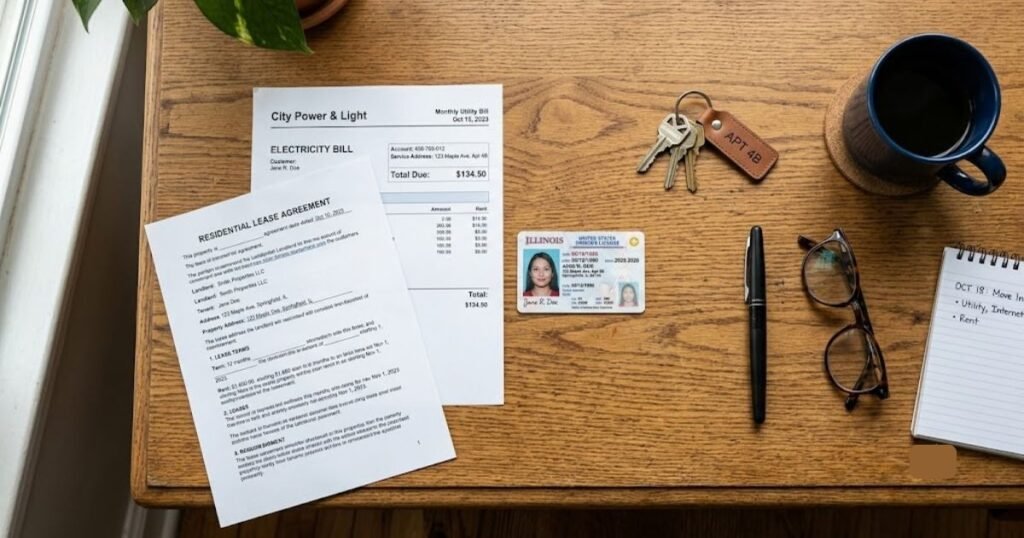
| Lease / Rental Agreement | Demonstrates separate rental contracts or room rentals | Multi-family homes, room rentals, roommates |
| Utility Bill (Electric, Gas, Water) | Proves individual responsibility for living costs | Multi-unit buildings, duplexes |
| Driver’s License or State ID | Confirms identity and physical street address | Address verification errors |
| Benefit Award Letter (SSI, SNAP, VA) | Proves official income source is made out solely to you | Seniors or disabled individuals living with family |
| Nursing Home / Facility Verification Letter | Confirms residence in a commercial group environment | Assisted living, nursing facilities, group homes |
| Official Postal Service Move Notice | Shows recent change of official address | Applicants who recently moved |
READ MORE: 8 Best Light Lawn Mower for Seniors: Review & Comparison
Special Situations
- Seniors living with adult children: If you and your adult child manage separate finances even though you share a home, the Household Worksheet is your path to a separate benefit.
- Nursing homes and assisted living: Whether residents count as separate households often depends on how the facility bills for services and whether care costs are individually managed.
- Multi-family homes and duplexes: Make sure your unit number is clearly listed on your application. A missing unit number is one of the most common causes of a false duplicate match.
- Apartments: Same issue as duplexes — an incomplete address is often mistaken for a neighbor’s unit.
- College students: A student living away from a parent’s home but still listed under the parent’s address in some records may need to update their address before reapplying.
- Shared housing and roommates: Roommates who keep separate finances can usually both qualify with a completed Household Worksheet.
- Shelters and group homes: These addresses often have many residents, so expect a duplicate flag and be ready to explain your individual circumstances.
What If You Recently Moved?
Moving is one of the most common triggers for a duplicate error. Here’s why: your old provider may not have canceled your previous Lifeline service, or your new address hasn’t synced across the databases the National Verifier checks yet.
- Update your address with your Lifeline provider and through the National Verifier as soon as you move.
- Ask about your old account. If your prior provider never formally closed your Lifeline benefit, that ghost account can cause a duplicate flag at your new address.
- Expect some delay. Address updates and provider transfers can take a little time to fully process across the system.
- Keep proof of your move, such as a new lease or a recent utility bill, in case you need to verify your new address.
How Long Does Lifeline Duplicate Review Take?
Timelines vary depending on how you submit your information and how complete your documents are. As a general pattern:
- Documents submitted online during business hours are often reviewed within minutes.
- Documents mailed to the Lifeline Support Center typically take about seven to ten business days once received.
- If USAC needs additional documents, the clock effectively restarts once you resubmit.
We won’t promise you an exact turnaround, because your specific case, the completeness of your paperwork, and current review volume all affect the timeline. While you wait, keep using your current phone or internet service as normal, and hold onto copies of everything you’ve submitted.
READ MORE: 8 Best Smartwatch for Hiking With GPS and Heart Rate
Common Mistakes That Cause Duplicate Errors
- Applying more than once, sometimes with slightly different information
- Listing the wrong or incomplete address
- Forgetting an apartment, suite, or unit number
- Leaving an old Lifeline account open with a previous provider
- Not canceling service before switching to a new Lifeline provider
- Misspelling your legal name or using a nickname
- Confusion over a shared mailing address, like a P.O. box
Tips for Seniors
- Keep copies of every document you submit, along with the date you sent it.
- Ask a trusted caregiver, family member, or case worker to help you gather paperwork.
- Always use official government or benefit documents, not screenshots or handwritten notes.
- Double-check your address for typos and make sure your apartment number is included.
- Respond to any USAC or provider notice as quickly as you can — delays add up fast.
Myth vs. Fact
| Myth | Fact |
| “Two people living in the same house can never both get Lifeline.” | FALSE. Unrelated roommates or family members who maintain completely separate finances qualify as separate households and can each receive Lifeline. |
| “If my application is flagged as a duplicate, I am disqualified for the year.” | FALSE. A duplicate flag is simply a request for clarification. Submitting the Household Worksheet resolves the flag. |
| “A caregiver can e-sign the application for a senior.” | FALSE. The applicant must e-sign or mark the form themselves unless formal Power of Attorney documents are provided. |
| “I can have Lifeline discounts on both my cell phone and home internet.” | FALSE. The Lifeline rule allows one discount per economic household, applied to either phone service OR broadband internet, but not both. |
READ MORE: Best 6 Anti Aging Supplements for Seniors: Reviews, Comparison & Buying Guide
Expert Tips to Avoid and Resolve Duplicate Errors
- Apply once, and only once — don’t submit a second application “just in case.”
- Always double-check your address for spelling, abbreviations, and unit numbers before submitting.
- If you moved in the last year, confirm your old Lifeline account was properly closed.
- Use your full legal name exactly as it appears on your ID.
- Submit documents online instead of by mail whenever you’re able to — it’s faster.
- Never send original documents; USAC only wants copies.
- If mailing paperwork, always include the official cover sheet.
- Keep a personal folder — paper or digital — with copies of every document you submit.
- Respond to any request for more information within a few days, not weeks.
- If you’re unsure whether you share a household with someone, ask yourself: do we pool money for bills?
- Call the Lifeline Support Center directly if your online status hasn’t changed after a week or two.
- Ask your provider’s Lifeline representative to check your file — they can often see details you can’t.
- If you believe someone fraudulently used your address, report it rather than trying to fix it yourself.
- Recertify on time every year to avoid new errors popping up down the road.
- Be patient but persistent — most duplicate errors are resolved with the right paperwork, not by starting over.
Warning: Don’t apply for Lifeline through a second provider while your first application is still pending. This is one of the fastest ways to create a duplicate subscriber error and delay your approval even further.
Frequently Asked Questions
How do I fix a Lifeline household duplicate error?
For a duplicate address error, complete the Lifeline Household Worksheet to show you’re financially independent from others at your address. For a duplicate subscriber error, your provider can often resolve it directly by transferring or closing an old account.
Can two seniors living at the same address both receive Lifeline?
Yes, as long as they truly manage separate finances. Living at the same address doesn’t automatically make two people the same household. If each person covers their own income and expenses independently, both may qualify for their own Lifeline benefit.
What is the Lifeline Household Worksheet used for?
It’s the official form USAC uses to determine whether an applicant is part of an existing household at their address or qualifies as an independent economic household. It asks about shared income, shared expenses, and living arrangements to help resolve a duplicate address error.
Why does the National Verifier say my household is a duplicate?
The system automatically checks every new application against existing Lifeline accounts. If someone else at your address already has an active benefit, or if your own identity matches an existing account, the system flags your application so USAC can confirm whether you truly qualify for a separate benefit.
How long does it take to resolve a Lifeline duplicate application?
It depends on how you submit your documents. Online submissions during business hours are often reviewed within minutes, while mailed documents generally take about seven to ten business days once received. Incomplete paperwork or additional document requests can extend the timeline.
Conclusion
A Lifeline duplicate household error can feel discouraging, especially if you’re counting on that monthly discount to stay connected with family, doctors, and support services. But in most cases, this is a solvable paperwork issue, not a permanent roadblock. Take a moment to look closely at your living situation, gather a few key documents, complete the Household Worksheet if it applies to you, and respond promptly to any request from USAC. If you get stuck at any point, the Lifeline Support Center and your service provider are there to help walk you through it. Verifying your household information now is the fastest way to get your benefit approved and keep it active for the year ahead.