If you’ve been searching for the best flip phone for seniors, you’re not alone. Even with smartphones everywhere, millions of older adults and the families who love them still prefer a phone that just makes calls, sends texts, and works when it matters most.
There’s a good reason for that. Flip phones have real buttons you can feel. The screen doesn’t fill up with confusing apps. The battery lasts for days, not hours. And if something goes wrong, many models have a dedicated SOS button that can call for help with one press.
This guide covers seven of the top senior-friendly flip phones on the market right now, including options built for hearing loss, poor eyesight, arthritis, and emergency communication. We’ll also walk through what to look for, how to set one up for an aging parent, and which model fits which type of senior. Lets deep dive into “Best Flip Phone for Seniors (2026): 7 Easy-to-Use Picks”
Key Takeaway: The best flip phone for seniors isn’t always the one with the most features. It’s the one that matches the person’s hearing, vision, dexterity, and safety needs.

READ MORE: Best Budget TVs for Older Adults: Easy, Comfortable, and Senior-Friendly Picks
Why Flip Phones Are Still the Best Choice for Many Seniors
Smartphones aren’t going anywhere, but for a large number of older adults, a flip phone is simply the better tool for the job. Here’s why.
- Physical buttons. You can feel where your finger lands. There’s no tapping a tiny glass screen and missing the mark.
- Easier calling. Flip the phone open, and the call connects. Close it, and the call ends. No swiping required.
- Less confusion. A short list-style menu beats a home screen full of icons.
- Better battery life. Most flip phones easily last 5–10 days on standby, compared to a single day for many smartphones.
- Fewer distractions. No endless notifications, no social media pulling attention away.
- Strong durability. Many models are built to survive drops, dust, and water.
- Lower monthly costs. Basic-phone plans typically run far cheaper than smartphone data plans.
- Reduced scam exposure. Without app stores, browsers, or email inboxes, there are fewer doors for scammers to walk through.
What to Look for Before Buying a Flip Phone for Seniors
Not all flip phones are created equal. Here’s what actually matters.
- Large Buttons — Big, raised, well-spaced buttons matter enormously for people with arthritis, tremors, or reduced dexterity.
- Bright Display — High-contrast text and large fonts help with age-related vision changes like macular degeneration or cataracts.
- Loud Speaker — Look for speakers rated 90+ decibels. This is essential for anyone with hearing loss.
- Hearing Aid Compatibility (HAC) — The FCC requires compatible phones to be rated at least M3 (microphone mode) and T3 (telecoil mode), or simply labeled “Hearing Aid Compatible” under the newer 2019 standard.
- SOS Button — A dedicated emergency key that can dial multiple pre-set contacts automatically.
- Long Battery Life — Look for phones that go a week or more between charges.
- Dock Charging — A charging cradle is far easier than lining up a tiny charging port.
- Rugged Design — Water and drop resistance (look for IP68 ratings) add peace of mind.
- Easy Navigation — Simple, list-based menus beat icon grids.
- Large Text — Adjustable font sizes make a real difference for daily use.
- Voice Commands — Some models include Alexa or basic voice dialing for hands-free use.
- 4G LTE Compatibility — This is non-negotiable. Every 3G network in the U.S. has shut down.
- Unlocked vs. Carrier-Locked — Unlocked phones give you flexibility to choose or switch carriers.
- Camera Quality — A basic camera is nice for photos of grandkids, but rarely a priority.
- Emergency Features — GPS location sharing, medical ID storage, and caregiver alerts add another safety layer.
Buying Checklist:
- [ ] 4G LTE (required — 3G no longer works)
- [ ] Loud speaker (90dB+)
- [ ] Large, tactile buttons
- [ ] SOS button
- [ ] Hearing aid compatible
- [ ] Battery lasts 5+ days
- [ ] Works with your preferred carrier
READ MORE: Best Wireless TV Headphones for Seniors– Clear Sound & Easy Setup
Best Flip Phones for Seniors (Detailed Reviews)
1. Kyocera DuraXV Extreme E4810 (Verizon, IP68 Rated)
The DuraXV Extreme is built for seniors who spend time outdoors, live in rural areas, or simply want a phone that can survive a hard drop. It’s one of the most rugged basic phones sold on Verizon’s network.
- Key Features: IP68 waterproofing, MIL-STD-810G drop protection, large tactile keypad, customizable large fonts, and a removable 1770mAh battery.
- Design & Ease of Use: The keypad is spaced generously, and the menu lets users boost font size for easier reading. Programmable keys give quick access to speaker, alerts, and push-to-talk functions.
- Audio & Call Quality: Verizon’s network is known for strong rural coverage, and the phone supports HD Voice for clearer calls.
- Battery Life: Multiple days of standby with normal use, plus Eco and Battery Care modes to stretch it further.
- Durability: This is the standout feature — dust-proof, waterproof to 6.5 feet, and rated to survive 5-foot drops onto concrete.
- Pros:
- Exceptional durability for active, outdoor seniors
- Verizon’s dependable rural coverage
- Removable battery for easy replacement
- Cons:
- Verizon-only, not usable on other carriers
- Bulkier than slimmer flip phones
- Higher price point than basic models
Best For: Seniors who travel, live rurally, or spend time outdoors. Overall Rating: 4.7/5

2. VAHVARNA Rugged Flip Phone (4G LTE Unlocked, 2.8″ Touchscreen)
This model blends a traditional flip design with a touchscreen and Android 11 (Go edition) underneath, offering more flexibility than a typical basic phone.
- Key Features: IP68 rugged build, 2.8″ touchscreen plus 1.44″ external display, 100dB speaker, GPS, and glove-friendly touch response.
- Design & Ease of Use: The touchscreen adds a small learning curve compared to a pure button phone, but the interface stays simple, and physical keys remain for calls.
- Battery Life: A 2000mAh removable battery delivers around 11 hours of talk time or roughly six days of standby.
- Durability: Built to resist water, dust, and drops, with Gorilla Glass protecting the touchscreen.
- Pros:
- Genuinely rugged for a touchscreen device
- Loud 100dB speaker
- Works on multiple GSM carriers
- Cons:
- Touchscreen may be less intuitive for some seniors than pure buttons
- No dedicated one-press SOS key
- Slightly heavier than standard flip phones
Best For: Seniors comfortable with light touchscreen use who still want a rugged, unlocked device. Overall Rating: 4.2/5

3. VAHVARNA Oasis M1 Flip Phone (Unlocked 4G LTE)
The Oasis M1 runs on KaiOS and was clearly designed with accessibility in mind, making it one of the more senior-focused options in the VAHVARNA lineup.
- Key Features: Backlit large buttons, dual displays, hearing aid compatibility (HAC) settings, large text, captions, and keypad vibration.
- Design & Ease of Use: Backlit buttons help in low light, and the accessibility menu includes invert color and mono audio options for users with hearing or vision loss.
- Emergency Features: A rear SOS button, held for three seconds, automatically dials up to five emergency contacts and sends a text alert.
- Battery Life: Long standby time, well-suited to seniors who don’t use their phone constantly.
- Pros:
- Built-in accessibility settings for hearing and vision loss
- Backlit buttons for nighttime use
- Affordable for the feature set
- Cons:
- Not compatible with Verizon
- KaiOS has a smaller app selection than Android
- Smaller brand with less widespread customer support
Best For: Seniors with hearing loss, low vision, or arthritis who want built-in accessibility tools. Overall Rating: 4.4/5

- 【Unlocked Flip Phone, Universal 4G LTE Network Compatibility】This 4G mobile phone is unlocked and compatible with most o…
- 【KaiOS 4G Flip Phone】Equipped with Qualcomm Snapdragon 215 (28nm) chip which delivers smooth and powerful performance. K…
- 【Backlit Big Button & Dual Display Screen】The VAHVARNA Oasis M1 flip phone has large physical buttons, suitable for seni…
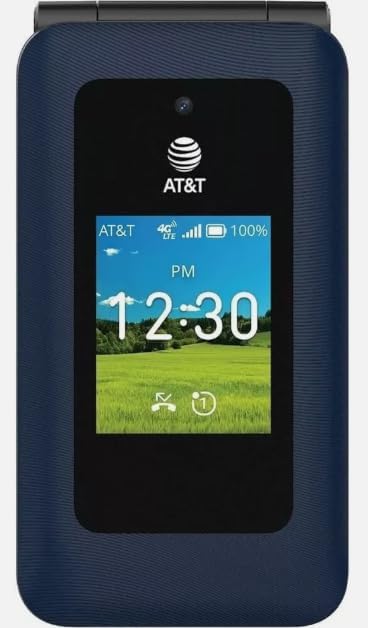
4. AT&T Cingular Flex 2 (Unlocked, 4GB)
The Cingular Flex 2 sits between a basic flip phone and a smartphone. It runs KaiOS 3.1, which supports a handful of Google apps without the complexity of a full Android phone.
- Key Features: KaiOS with Google Maps, Google Search, and YouTube access, Wi-Fi, GPS, VoLTE, and a large tactile keypad.
- Design & Ease of Use: The interface stays list-based and simple, even with smart features layered in, which keeps the learning curve manageable.
- Battery Life: A 1500mAh removable battery supports several days of typical use.
- Pros:
- Nice middle ground between “dumb phone” and smartphone
- Access to Google Maps and voice assistant tools
- Works on AT&T and T-Mobile
- Cons:
- No dedicated SOS button
- Limited RAM can make apps load slowly
- Smaller company support network compared to Verizon-backed options
Best For: Seniors who want a few smart features (like GPS maps) without a full smartphone. Overall Rating: 4.0/5
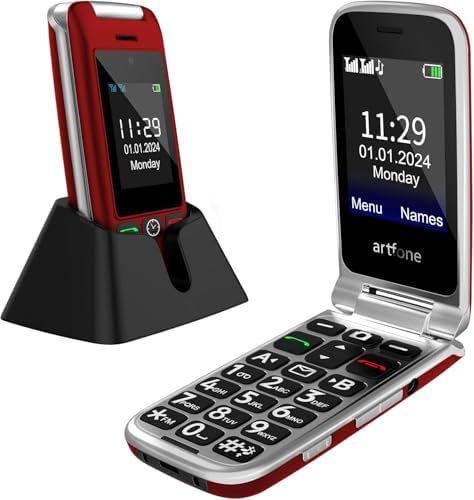
5. artfone G6 Flip Phone for Seniors (4G Unlocked)
The artfone G6 is a budget-friendly option built specifically around senior usability, with one of the largest button counts in this roundup.
- Key Features: SOS button dialing up to five contacts, 21 oversized backlit buttons, dual LCD screens, charging dock, and a one-button voice time announcement.
- Design & Ease of Use: The hinge is tested for 120,000 flips, and the backlit keypad makes texting easier for users with vision changes. T9 predictive text speeds up messaging.
- Battery Life: Around 5–6 hours of talk time and up to 10 days of standby.
- Pros:
- Excellent value for the accessibility features included
- Large, backlit, well-spaced buttons
- Stores up to 1,000 contacts with photo ID
- Cons:
- Camera quality is very basic (0.3MP on some versions)
- Smaller brand, so support may be slower
- Battery capacity is modest compared to rugged models
Best For: Budget-conscious buyers who still want strong accessibility features. Overall Rating: 4.3/5
6. SilisoundTek Dual Screen Flip Phone (2.8″ + 1.5″, Unlocked 4G LTE)
This dual-screen flip phone focuses on simplicity, loud volume, and a clean caller-ID display, making it a solid all-around basic phone.
- Key Features: SOS button, speed dial, large fonts, charging dock, and a 1400mAh battery.
- Design & Ease of Use: The outer 1.5″ screen shows caller ID and time without opening the phone, and the menu stays straightforward.
- Battery Life: Roughly 6–8 hours of talk time and up to 336 hours (14 days) of standby.
- Pros:
- Long standby battery life
- Simple, uncluttered menu system
- Affordable price point
- Cons:
- Best compatibility is with T-Mobile and its GSM network partners; not built for Verizon or AT&T
- Basic camera and no advanced smart features
- Limited brand recognition and support history
Best For: Seniors who want an easy, no-frills phone at a low cost. Overall Rating: 4.1/5

7. LIVELY Jitterbug Flip2 Cell Phone for Seniors
The Jitterbug Flip2 remains one of the most trusted names in senior phones, largely because it pairs a simple device with a genuinely helpful support ecosystem.
- Key Features: Large keypad, built-in Amazon Alexa, an Urgent Response button, an 8MP camera, and a one-touch speed dial.
- Design & Ease of Use: Everything about the Flip2 is designed for simplicity — big buttons, a large screen, and voice commands for anyone who struggles with typing.
- Emergency Features: The Urgent Response button connects to IAED-certified agents 24/7 (available with Lively’s Preferred and Premium plans). Family members can also get instant alerts through the Lively Link app when Urgent Response is used.
- Battery Life: Multiple days on a single charge with normal use.
- Pricing: The phone itself costs $79.99, plans start around $19.99–$49.99 per month, and there’s typically a one-time activation fee of up to $35.
- Pros:
- 24/7 Urgent Response with real human agents
- Built-in Alexa for hands-free calling and texting
- Runs on Verizon’s network for strong coverage
- Highly rated, U.S.-based customer support
- Cons:
- Locked to Lively’s service plans — no other carrier works
- No internet access, so no maps or apps
- Urgent Response and health features require a paid add-on plan
Best For: Older adults who want maximum simplicity plus real emergency response and caregiver features. Overall Rating: 4.6/5

READ MORE: Best Wireless Earbuds for Senior Runners: Top Picks
Side-by-Side Comparison of Flip Phones
| Phone | Screen Size | Network | Unlocked | Battery Life | SOS Button | Hearing Aid Friendly | Durability | Camera | Weight | Best User | Overall Score |
| Kyocera DuraXV Extreme+ | Large, high-contrast | Verizon only | No | Multi-day | Yes | Historically strong HAC ratings | IP68 / MIL-STD-810G | 5MP | Rugged, heavier | Outdoor/rural seniors | 4.7/5 |
| VAHVARNA Rugged Flip | 2.8″ + 1.44″ | T-Mobile, AT&T | Yes | ~6 days standby | No | Not specified | IP68 | 5MP + 2MP | Rugged, moderate | Active seniors | 4.2/5 |
| VAHVARNA Oasis M1 | 3.2″ + 2.0″ | T-Mobile, AT&T | Yes | Long standby | Yes | Built-in HAC settings | Standard | Basic | Lightweight | Hearing/vision-impaired seniors | 4.4/5 |
| AT&T Cingular Flex 2 | 2.8″ + 1.77″ | AT&T, T-Mobile | Yes | Several days | No | Not specified | Standard | 2MP | Compact | Seniors wanting light smart features | 4.0/5 |
| artfone G6 | 2.4″ + 1.8″ | AT&T, T-Mobile | Yes | ~10 days standby | Yes | Not specified | Standard | 0.3–2MP | Compact | Budget buyers | 4.3/5 |
| SilisoundTek Dual Screen | 2.8″ + 1.5″ | T-Mobile & MVNOs | Yes | ~14 days standby | Yes | Not specified | Standard | Basic | Compact | Simplicity seekers | 4.1/5 |
| LIVELY Jitterbug Flip2 | Large single screen | Verizon (via Lively) | No | Multi-day | Yes (Urgent Response) | Loud speaker, Alexa voice control | Standard | 8MP | Lightweight | Seniors needing emergency support | 4.6/5 |
READ MORE: Best Health Tracking Smartwatch for Seniors— Top 8 Picks Compared
Which Flip Phone Is Best for Different Types of Seniors?
Seniors with arthritis:
Look for large, well-spaced, backlit buttons. The artfone G6 and VAHVARNA Oasis M1 both stand out here.
Seniors with hearing loss:
Prioritize hearing aid compatibility and loud speakers. The VAHVARNA Oasis M1’s built-in HAC settings and the Jitterbug Flip2’s powerful speaker are strong choices. Always confirm the M3/T3 (or “Hearing Aid Compatible”) rating for a specific handset before buying.
Seniors with poor eyesight:
Bright, high-contrast displays with adjustable font size matter most. The Kyocera DuraXV Extreme+ and artfone G6 both offer large-font menus.
Seniors living alone:
An SOS button is essential. The Jitterbug Flip2’s Urgent Response feature adds a layer of professional emergency monitoring that basic SOS buttons don’t include.
Travelers:
An unlocked phone gives the most flexibility to swap SIM cards. The VAHVARNA models and AT&T Cingular Flex 2 all work unlocked.
Outdoor users:
Durability matters most. The Kyocera DuraXV Extreme+ and VAHVARNA Rugged Flip are both IP68-rated.
Budget buyers:
The artfone G6 and SilisoundTek Dual Screen offer strong value without sacrificing core accessibility features.
Caregivers buying for parents:
Consider the Jitterbug Flip2 for its caregiver app integration (Lively Link) and Urgent Response alerts that notify family members automatically.
Flip Phone vs. Smartphone for Seniors
| Category | Flip Phone | Smartphone |
| Ease of use | Very simple, physical buttons | Steeper learning curve |
| Safety | Fewer apps, lower scam exposure | More exposure to phishing/scam apps |
| Battery | Days between charges | Daily charging usually required |
| Apps | Minimal or none | Full app ecosystem |
| Cost | Lower device and plan cost | Higher device and data costs |
| Durability | Often rugged, simple hardware | Glass screens, more fragile |
| Learning curve | Short | Longer, ongoing updates |
| Emergency calling | Often includes dedicated SOS key | Possible but requires app setup |
READ MORE: Best Robot Lawn Mowers for Seniors Review: Comparison & Buying Guide
Pros and Cons of Flip Phones
Pros:
- Simple, tactile interface
- Long battery life
- Lower cost of ownership
- Reduced scam and distraction risk
- Often more durable
Cons:
- Limited or no internet access
- Fewer apps for navigation, video calls, or photos
- Smaller text-input options (no full keyboard)
- Some models are carrier-locked
How to Set Up a Flip Phone for an Elderly Parent
- Charge it fully before handing it over. Nothing is more frustrating than a dead phone on day one.
- Add emergency contacts first. Program family members, doctors, and any Urgent Response numbers into the address book.
- Set up speed dial. Assign the most-called people (spouse, children, doctor) to single-digit keys.
- Increase the font size. Most phones have a menu setting to bump text size up.
- Raise the ring and speaker volume. Test it in a normal living room to make sure it’s loud enough.
- Activate the SOS button. Walk through exactly how it works, and test it together if possible.
- Add medical information. Store allergies, medications, and emergency contacts where first responders can find them.
- Set a charging routine. Place the charging dock somewhere visible, like next to their favorite chair or nightstand.
- Do a practice call. Have them call and text you once while you’re both together, so it’s not the first time they’re doing it alone.
READ MORE: Robotic Vacuum for Seniors: Best Features, Comparison, Reviews, and Buying Guide
Common Mistakes Seniors Make When Buying a Flip Phone
- Ignoring carrier compatibility. Not every flip phone works with every network — always confirm before buying.
- Skipping the hearing aid compatibility check. Not all phones list HAC ratings clearly.
- Choosing based on price alone. The cheapest phone isn’t always the easiest to use.
- Forgetting about battery replacement. Non-removable batteries can be a problem years down the road.
- Not testing button size in person. Photos can be misleading — button spacing matters in real life.
- Overlooking the SOS feature. Some phones market “safety features” that are really just basic speed dial, not true emergency monitoring.
- Assuming 3G still works. All 3G networks in the U.S. have been shut down — only 4G LTE phones will work.
- Not asking about activation fees. Some senior-focused plans include setup costs that aren’t obvious upfront.
- Buying without a return policy. Always check the return window in case the phone doesn’t suit daily needs.
- Skipping a hands-on trial. Whenever possible, let the senior test the buttons and screen in a store before buying online.
Expert Buying Tips
After comparing dozens of senior-focused phones, a few patterns stand out. Phones with dedicated SOS buttons consistently score higher in real-world usability than phones that rely on menu-based emergency dialing, simply because there’s less to remember during a stressful moment.
Reliability also tends to matter more than feature count. A phone from Verizon’s network (like the Kyocera or Jitterbug Flip2) usually delivers stronger rural coverage than budget-brand unlocked phones, which matters enormously for seniors in less-populated areas.
Finally, don’t underestimate customer support. Brands like Lively that offer live, U.S.-based help lines tend to reduce frustration far more than saving $20–30 upfront on a lesser-known brand.
Final Verdict
- Best Overall: LIVELY Jitterbug Flip2 — balances simplicity, safety, and real customer support.
- Best Budget: artfone G6 — strong accessibility features at a low price.
- Best Rugged: Kyocera DuraXV Extreme+ — built to survive drops, dust, and water.
- Best Premium: VAHVARNA Rugged Flip Phone — touchscreen flexibility with rugged construction.
- Best for Hearing Loss: VAHVARNA Oasis M1 — dedicated HAC accessibility settings.
- Best for Simplicity: SilisoundTek Dual Screen — clean, no-frills design.
- Best Value: artfone G6 — the most accessibility features per dollar spent.
Every senior has different needs, so the “best” phone really depends on hearing, vision, dexterity, and how much emergency support matters to your family.
FAQ Section
What is the best flip phone for seniors?
The overall best flip phone for seniors is the Lively Jitterbug Flip2. It features a large 3.2-inch high-contrast display, simple YES/NO navigation buttons, and voice commands powered by Amazon Alexa. Additionally, it offers optional 24/7 emergency assistance via a dedicated Urgent Response button.
Which flip phone has the biggest buttons?
The artfone G6 and Lively Jitterbug Flip2 feature some of the largest physical buttons on the market. The artfone G6 combines oversized, backlit rubber keys with a Talking Keypad feature that audibly speaks each digit aloud as it is pressed, helping users with vision impairment avoid dialing mistakes.
Are flip phones still supported in the USA?
Yes, flip phones are fully supported in the USA, provided they are 4G LTE VoLTE compliant. Major U.S. carriers (Verizon, AT&T, T-Mobile) have retired legacy 2G and 3G networks. All current 4G LTE flip phones deliver crisp HD voice calls and will remain fully functional on nationwide networks.
What is the easiest cell phone for seniors to use?
The Lively Jitterbug Flip2 is widely considered the easiest phone for seniors. It replaces complex app icons with a simple, list-based text menu. Users navigate using clear YES and NO buttons or make calls completely hands-free using built-in Amazon Alexa voice prompts.
Which flip phone works best with hearing aids?
The Kyocera DuraXV Extreme and Lively Jitterbug Flip2 are top choices for hearing aid users. Both feature official M4/T4 Hearing Aid Compatibility ratings, ensuring loud, clear earpiece audio and hands-free speakerphone performance without static interference or squealing feedback.


Pingback: Transfer Lifeline Service to a New Provider (2026 Guide) - Free Senior Grants